
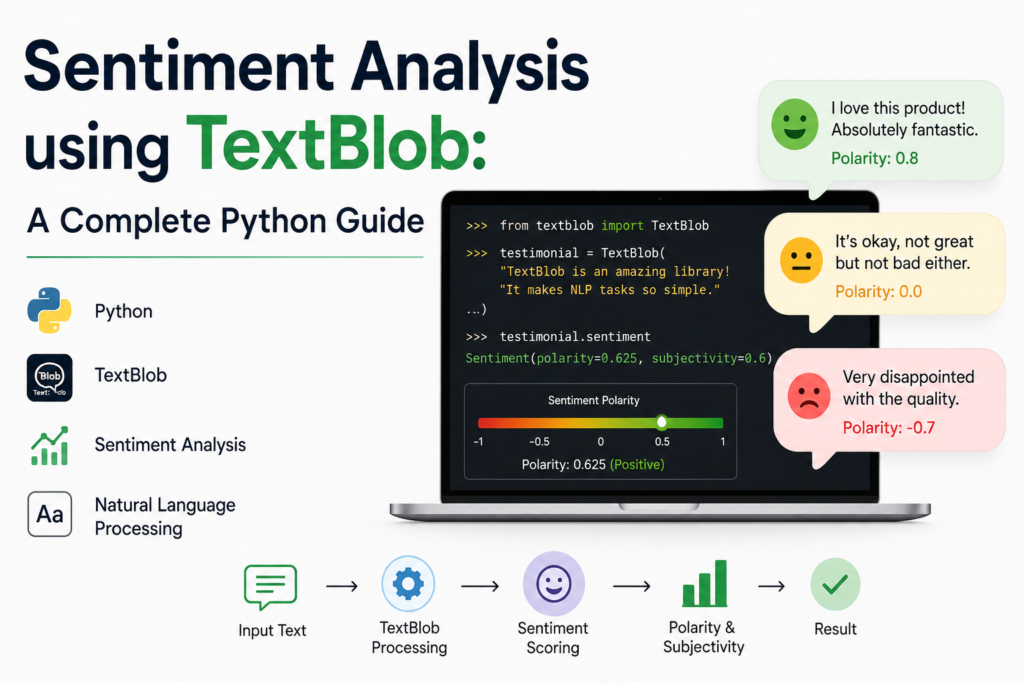
Ever wondered how companies know if customers are happy or angry — just from text? That’s sentiment analysis at work. And one of the easiest ways to get started with it in Python is using TextBlob.
In this guide, you’ll learn exactly what sentiment analysis is, how TextBlob handles it under the hood, and how to build a working sentiment analyzer step by step — with real, runnable code.
Let’s get into it.
Table of Contents
- What is Sentiment Analysis?
- What is TextBlob?
- How TextBlob Calculates Sentiment
- Setting Up Your Environment
- Basic Sentiment Analysis with TextBlob
- Analyzing Multiple Texts
- Sentiment Analysis on Real-World Data (CSV)
- Visualizing Sentiment Results
- Limitations of TextBlob
- TextBlob vs VADER vs Transformers
- FAQs
What is Sentiment Analysis?
Sentiment analysis (also called opinion mining) is an NLP technique that identifies and extracts subjective information from text — primarily whether the expressed opinion is positive, negative, or neutral.
It’s used everywhere:
- E-commerce — analyzing product reviews at scale
- Social media — tracking brand perception in real time
- Customer support — auto-prioritizing angry tickets
- Finance — gauging market sentiment from news headlines
- Politics — analyzing public opinion on policies
The demand for sentiment analysis is only growing. With billions of text messages, tweets, and reviews generated daily, no human team can read it all — that’s where NLP comes in.
What is TextBlob?
TextBlob is a Python library built on top of NLTK and Pattern that provides a simple API for common NLP tasks — including sentiment analysis, POS tagging, noun phrase extraction, translation, and more.
It’s not the most powerful sentiment tool out there (we’ll compare alternatives later), but it’s:
- Beginner-friendly — minimal setup, clean API
- Fast to prototype with — 3 lines of code to get a sentiment score
- Good enough for general English text with clear positive/negative language
How TextBlob Calculates Sentiment
TextBlob uses a lexicon-based approach. It has a built-in dictionary of words, each pre-assigned a polarity score and a subjectivity score.
It returns two values for any text:
Polarity — a float between -1.0 and 1.0
-1.0→ very negative0.0→ neutral+1.0→ very positive
Subjectivity — a float between 0.0 and 1.0
0.0→ very objective (factual)1.0→ very subjective (opinion-based)
TextBlob averages the scores of individual words in the text, taking into account modifiers like “very”, “not”, “extremely” that shift polarity.
Setting Up Your Environment
Install TextBlob
pip install textblobDownload required NLTK corpora
python -m textblob.download_corporaThis downloads the underlying NLTK data TextBlob relies on. You only need to do this once.
Verify the install
from textblob import TextBlob

test = TextBlob("TextBlob is working perfectly.")
print(test.sentiment)

# Output: Sentiment(polarity=0.4, subjectivity=0.75)
If you see a Sentiment object, you’re good to go.
Basic Sentiment Analysis with TextBlob
Let’s start simple — analyzing a single piece of text.
from textblob import TextBlob

def analyze_sentiment(text):
    blob = TextBlob(text)
    polarity = blob.sentiment.polarity
    subjectivity = blob.sentiment.subjectivity

    if polarity > 0.05:
        sentiment = "Positive 😊"
    elif polarity < -0.05:
        sentiment = "Negative 😞"
    else:
        sentiment = "Neutral 😐"

    return {
        "text": text,
        "polarity": round(polarity, 3),
        "subjectivity": round(subjectivity, 3),
        "sentiment": sentiment
    }

# Test it
result = analyze_sentiment("This product is absolutely amazing! I love it.")
print(result)

# Output:

{
  'text': 'This product is absolutely amazing! I love it.',
  'polarity': 0.625,
  'subjectivity': 0.7,
  'sentiment': 'Positive 😊'
}
Analyzing Multiple Texts
In real projects, you’ll almost always be analyzing a batch of texts — reviews, tweets, support tickets. Here’s how to handle that cleanly.
from textblob import TextBlob

reviews = [
    "The camera quality on this phone is outstanding. Best I've ever used.",
    "Completely disappointed. The battery dies within 3 hours. Waste of money.",
    "It's an average product. Does the job but nothing special.",
    "Absolutely love the design! Feels premium and lightweight.",
    "Horrible customer service. They refused to process my refund.",
    "Decent product for the price. Would recommend for casual users."
]

print(f"{'Review':<55} {'Polarity':>10} {'Subjectivity':>14} {'Sentiment':>12}")
print("-" * 95)

for review in reviews:
    blob = TextBlob(review)
    polarity = blob.sentiment.polarity
    subjectivity = blob.sentiment.subjectivity

    if polarity > 0.05:
        sentiment = "Positive"
    elif polarity < -0.05:
        sentiment = "Negative"
    else:
        sentiment = "Neutral"

    print(f"{review[:52]:<55} {polarity:>10.3f} {subjectivity:>14.3f} {sentiment:>12}")

# Output:

Review                                                  Polarity   Subjectivity    Sentiment
-----------------------------------------------------------------------------------------------
The camera quality on this phone is outstanding...         0.625          0.700     Positive
Completely disappointed. The battery dies within...       -0.476          0.714     Negative
It's an average product. Does the job but nothin...        0.095          0.524      Neutral
Absolutely love the design! Feels premium and li...        0.450          0.600     Positive
Horrible customer service. They refused to proce...       -0.550          0.750     Negative
Decent product for the price. Would recommend fo...        0.320          0.540     Positive
Sentiment Analysis on Real-World Data (CSV)
Let’s take it up a notch — reading from a CSV file, which is how you’d do this in any real project.
Assume you have a reviews.csv file like this:
review_id,review_text
1,"Great product, highly recommended!"
2,"Worst purchase I've ever made."
3,"It's okay, nothing extraordinary."
import pandas as pd
from textblob import TextBlob
# Load the CSV
df = pd.read_csv("reviews.csv")
def get_sentiment_label(text):
polarity = TextBlob(str(text)).sentiment.polarity
if polarity > 0.05:
return "Positive"
elif polarity < -0.05:
return "Negative"
else:
return "Neutral"
def get_polarity(text):
return round(TextBlob(str(text)).sentiment.polarity, 3)
def get_subjectivity(text):
return round(TextBlob(str(text)).sentiment.subjectivity, 3)
# Apply to dataframe
df["polarity"] = df["review_text"].apply(get_polarity)
df["subjectivity"] = df["review_text"].apply(get_subjectivity)
df["sentiment"] = df["review_text"].apply(get_sentiment_label)
print(df)
# Save results
df.to_csv("reviews_with_sentiment.csv", index=False)
print("\nResults saved to reviews_with_sentiment.csv")
# Summary
print("\nSentiment Distribution:")
print(df["sentiment"].value_counts())
# Output
review_id review_text polarity subjectivity sentiment
0 1 Great product, highly recomm... 0.625 0.700 Positive
1 2 Worst purchase I've ever made. -0.600 0.900 Negative
2 3 It's okay, nothing extraordin 0.050 0.500 Neutral
Sentiment Distribution:
Positive 1
Negative 1
Neutral 1Visualizing Sentiment Results
Data without visualization is just numbers. Let’s plot the sentiment distribution and polarity spread.
import pandas as pd
import matplotlib.pyplot as plt
from textblob import TextBlob

# Sample data
reviews = [
    "Absolutely fantastic experience!",
    "Terrible, never buying again.",
    "It was okay, nothing special.",
    "Great quality and fast delivery.",
    "Product broke after one day. Very disappointed.",
    "Pretty good for the price.",
    "Not bad, but could be better.",
    "Love it! Exceeded all my expectations.",
    "Awful packaging, product was damaged.",
    "Decent enough, would consider buying again."
]

polarities = [TextBlob(r).sentiment.polarity for r in reviews]
sentiments = ["Positive" if p > 0.05 else "Negative" if p < -0.05 else "Neutral" for p in polarities]

df = pd.DataFrame({"review": reviews, "polarity": polarities, "sentiment": sentiments})

fig, (ax1, ax2) = plt.subplots(1, 2, figsize=(12, 5))

# Plot 1: Sentiment distribution
sentiment_counts = df["sentiment"].value_counts()
colors = {"Positive": "#2ecc71", "Neutral": "#f39c12", "Negative": "#e74c3c"}
ax1.bar(sentiment_counts.index,
        sentiment_counts.values,
        color=[colors[s] for s in sentiment_counts.index])
ax1.set_title("Sentiment Distribution", fontsize=14, fontweight="bold")
ax1.set_xlabel("Sentiment")
ax1.set_ylabel("Count")

# Plot 2: Polarity scores per review
bar_colors = [colors[s] for s in df["sentiment"]]
ax2.barh(range(len(df)), df["polarity"], color=bar_colors)
ax2.axvline(x=0, color="black", linestyle="--", linewidth=0.8)
ax2.set_title("Polarity Score per Review", fontsize=14, fontweight="bold")
ax2.set_xlabel("Polarity (-1 to +1)")
ax2.set_yticks(range(len(df)))
ax2.set_yticklabels([r[:30] + "..." for r in df["review"]], fontsize=8)

plt.tight_layout()
plt.savefig("sentiment_results.png", dpi=150)
plt.show()
This gives you a clean bar chart of sentiment distribution + a horizontal polarity chart per review — exactly what you’d include in a business report or dashboard.
Limitations of TextBlob
TextBlob is great for getting started, but it has real limitations you should know:
1. No context awareness
TextBlob analyzes word by word. It struggles with sarcasm:
TextBlob("Oh great, another Monday.").sentiment.polarity
# Returns: 0.8 (wrong — it's sarcastic)
2. English only
TextBlob’s sentiment lexicon is English-only. It won’t work reliably on Hindi, French, or mixed-language text.
3. Slang and abbreviations
Words like “lit”, “goat”, “lowkey” aren’t in its lexicon — it’ll score them as neutral.
4. Domain-specific language
In finance, “the stock killed it” is positive. TextBlob may not interpret domain jargon correctly.
5. Pre-trained, not fine-tunable
You can’t train TextBlob on your own data. For domain-specific tasks, you need a different approach.
TextBlob vs VADER vs Transformers
Choosing the right tool depends on your use case. Here’s a quick comparison:
| Feature | TextBlob | VADER | Transformers (BERT) |
|---|---|---|---|
| Ease of use | ⭐⭐⭐⭐⭐ | ⭐⭐⭐⭐ | ⭐⭐⭐ |
| Accuracy | Medium | Medium-High | Very High |
| Social media text | Poor | Excellent | Excellent |
| Sarcasm detection | No | Limited | Better |
| Speed | Fast | Fast | Slow (GPU helps) |
| Fine-tunable | No | No | Yes |
| Best for | Quick prototypes | Tweets, reviews | Production systems |
Quick rule of thumb:
- Learning / prototyping → TextBlob
- Social media / product reviews → VADER
- Production / high accuracy needed → Hugging Face Transformers
Here’s VADER for comparison:
# pip install vaderSentiment
from vaderSentiment.vaderSentiment import SentimentIntensityAnalyzer

sia = SentimentIntensityAnalyzer()

texts = [
    "Oh great, another Monday.",       # Sarcasm
    "This is ABSOLUTELY AMAZING!!!",   # Caps + punctuation
    "not bad at all"                   # Negation
]

for text in texts:
    score = sia.polarity_scores(text)
    print(f"Text: {text}")
    print(f"Scores: {score}\n")

# Output:

Text: Oh great, another Monday.
Scores: {'neg': 0.0, 'neu': 0.556, 'pos': 0.444, 'compound': 0.3612}

Text: This is ABSOLUTELY AMAZING!!!
Scores: {'neg': 0.0, 'neu': 0.214, 'pos': 0.786, 'compound': 0.7003}

Text: not bad at all
Scores: {'neg': 0.0, 'neu': 0.513, 'pos': 0.487, 'compound': 0.431}
VADER handles capitalization, punctuation emphasis, and negations better than TextBlob — especially for informal text.
Conclusion
TextBlob is one of the best tools to learn sentiment analysis fast. It gets you from zero to working results in under 10 lines of code, and it’s perfect for understanding the core concepts — polarity, subjectivity, and classification thresholds.
For production use cases — especially social media, multilingual text, or high-accuracy requirements — you’ll want to graduate to VADER or Hugging Face Transformers. But TextBlob is where most NLP practitioners start, and for good reason.
Try the examples in this article, experiment with your own text data, and see what patterns you find.
FAQs
1. What is TextBlob used for in Python?
TextBlob is a Python NLP library used for tasks like sentiment analysis, POS tagging, noun phrase extraction, language translation, and text classification. It’s particularly popular for beginners due to its simple, clean API.
2. How accurate is TextBlob for sentiment analysis?
TextBlob is moderately accurate for clean, formal English text. It struggles with sarcasm, slang, domain-specific language, and non-English text. For higher accuracy, consider VADER or fine-tuned transformer models.
3. What is polarity in TextBlob?
Polarity is a float score ranging from -1.0 (very negative) to +1.0 (very positive). A score near 0 indicates neutral sentiment. TextBlob calculates it by averaging the pre-assigned polarity scores of individual words in the text.
4. What is subjectivity in TextBlob?
Subjectivity measures how opinion-based vs fact-based a piece of text is, on a scale from 0.0 (fully objective) to 1.0 (fully subjective). A news headline typically scores low; a customer review typically scores high.
5. What’s the difference between TextBlob and VADER for sentiment analysis?
TextBlob works better for formal, well-structured text. VADER (Valence Aware Dictionary and Sentiment Reasoner) is specifically designed for social media — it handles emojis, capitalization, slang, and punctuation-based emphasis better. For tweets and reviews, VADER generally outperforms TextBlob.
6. Can TextBlob handle languages other than English?
TextBlob has a translation feature (via Google Translate API), so you can translate text to English first and then run sentiment analysis. But its built-in sentiment lexicon is English-only.
Next up: Want to go beyond TextBlob? Check out how we cover What is Natural Language Processing — the full NLP fundamentals guide with Python examples.
Popular Posts
- Build and Evaluate a RAG Pipeline with RAGAS, LangChain, FAISS, and Groq (Step-by-Step Guide)
- Loop Engineering Explained: From Prompt Engineering to Self-Prompting AI Agents
- Build Your First MCP Server with FastMCP: A Complete Python Tutorial
- MCP vs Function Calling: Key Differences Explained (2026)
- What Is Model Context Protocol (MCP) – A Complete Guide for AI Developers

But wanna comment that you have a very decent website , I love the style it really stands out.