
If you have built something with a Large Language Model API in the two years you have probably used function calling. You might not have known it by that name though. If you have used Claude Desktop, Cursor or a feature that connects your AI to your tools you have used Model-Calling Protocol or MCP for short. Here is the real question: Is MCP the same as function calling?
They are similar but not exactly the same. Both let a model choose a tool and get data back in a way. However saying they are basically the same can lead to mistakes. Some teams might overbuild a chatbot with a full MCP server. Others might under build a platform, with function calls that do not work well with tools. This guide explains what each one does and where they are similar. It also helps you decide which one to use for your project.
What Is Function Calling?
Function calling is a feature built directly into an LLM provider’s API. You describe your functions as JSON Schema, send that schema along with your prompt, and the model decides whether to call one of them. When it does, you get back structured arguments not text, an actual object that your own code then executes.
Here’s what that looks like with the OpenAI API:
tools = [
    {
        "type": "function",
        "function": {
            "name": "get_weather",
            "description": "Get current weather for a city",
            "parameters": {
                "type": "object",
                "properties": {
                    "city": {"type": "string", "description": "City name"}
                },
                "required": ["city"]
            }
        }
    }
]

response = client.chat.completions.create(
    model="gpt-5.5",
    messages=[{"role": "user", "content": "What's the weather in Mumbai?"}],
    tools=tools,
)
The model responds with a tool_calls array containing the function name and arguments. Your application parses that, runs get_weather(city="Mumbai") in your own code, and sends the result back to the model in a follow-up message. Anthropic’s Claude API and Google’s Gemini API both offer the same capability Anthropic calls it “tool use,” Google calls it “function calling” too but each one wraps the schema slightly differently, which matters more than it sounds like it should (more on that shortly).
The important thing to notice: the tool definition lives inside your API call. There’s no separate server, no discovery step, no protocol beyond “send this JSON, get that JSON back.”
What Is MCP?
The Model Context Protocol works differently. It uses a MCP server that shares tools, resources and prompts through a standard way of communicating. Any client that works with MCP like Claude Desktop or Cursor can link to this server. Find out what’s available when its running. You don’t have to hardcode anything into your prompt.
Our guide on the Model Context Protocol explains the details. But for now here’s the short version: MCP splits “defining a tool” from “calling a model”. It standardizes the part in between the same server works with any model. The Model Context Protocol makes it easy to use tools with models. MCP is a protocol, for working with models and tools.
How They Work, Side by Side
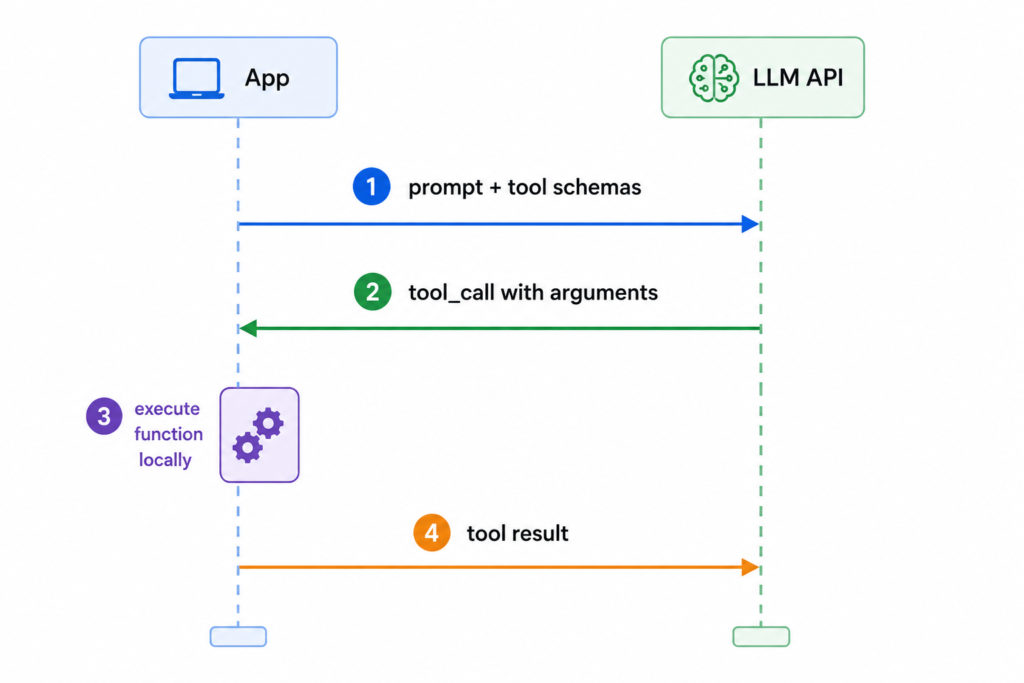
With function calling, the flow stays inside one process: your app sends the prompt and tool schemas to the model’s API, the model returns a tool call, your app’s own code executes it, and you send the result back in the next message. Four steps, one round trip per tool call, all within your application.
With MCP, there’s an extra hop. The host application (say, Claude Desktop) talks to an MCP client, which talks to one or more MCP servers over a standard transport (stdio or HTTP). When the model decides to call a tool, the client sends a tools/call request to the right server, the server executes the logic and returns a result, and the client hands that back to the model.
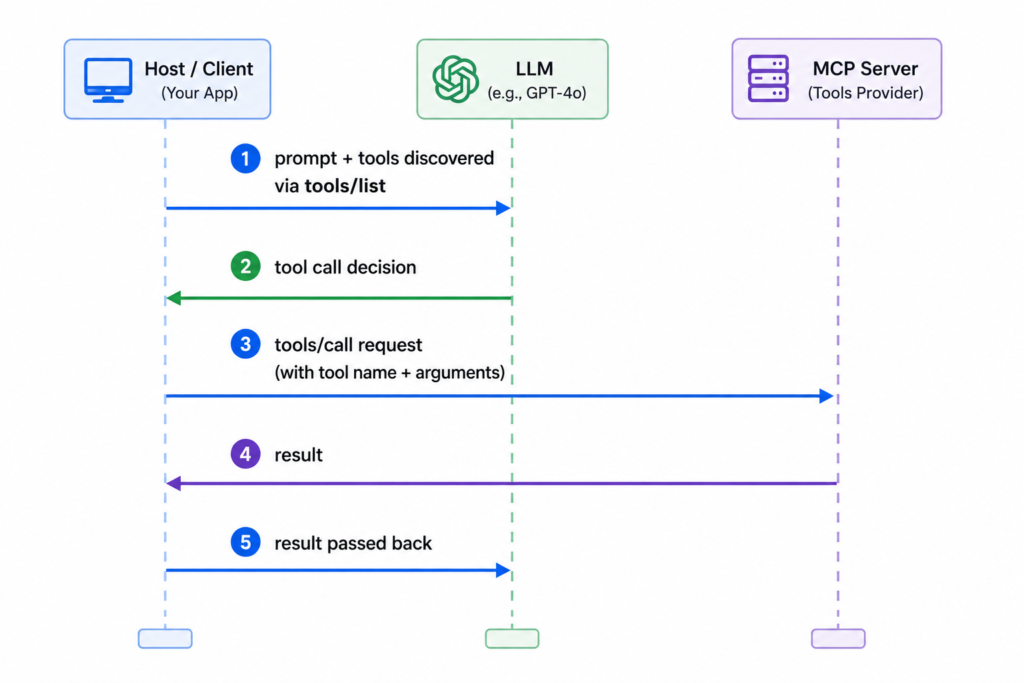
The extra hop is the whole point. It’s what lets the same server be reused across multiple clients without rewriting anything.
Key Differences: MCP vs Function Calling
This table is the one to bookmark. It’s where the architectural difference turns into a practical one.
| Dimension | Function Calling | MCP |
|---|---|---|
| Where tools live | Defined inline, inside each API call | Defined once, on a separate server |
| Portability across models | Tied to one provider’s schema format | Works with any MCP-compatible client/model |
| Discovery | Hardcoded in your prompt/code | Dynamic — client queries the server at runtime |
| Hosting | No separate process; runs inside your app | Requires running and maintaining a server process |
| Standardization | Each provider has its own schema shape | One protocol, shared across the ecosystem |
| Security/credentials | Managed in your application code | Can be centralized and isolated at the server |
| Setup complexity | Low — a JSON Schema and a function | Higher — a server, a transport, a client connection |
| Best for | App-local, single-provider, tight latency loops | Cross-client, cross-model, shared or distributed tools |
The “portability” row is where most teams get burned. If you write your tool schema for OpenAI’s tools format and later want to switch to Anthropic’s Claude API, you’re not just swapping an API key — you’re rewriting the schema wrapper, because OpenAI nests the schema inside a function object while Anthropic uses a flatter input_schema key. Multiply that by a dozen tools and a provider switch turns into a real migration project. MCP exists largely to remove that specific pain.
When to Use Function Calling
Function calling is a choice when your tool only needs to exist inside one application. It talks to one model provider. You want the amount of infrastructure between idea and working feature.
Here are some scenarios where it is the fit:
- You are building an app with a few tools. You have three or four functions a chatbot needs. For example look up an order check inventory create a support ticket. Nothing outside that one application will ever need them. Setting up a MCP server is extra work you do not need yet.
- Latency is very important. Function calling keeps everything in one process. There is no extra network hop to a server. This matters if you are building something, like a real-time voice assistant. Every hundred milliseconds counts.
- You control both ends and are not switching providers. If you are confidently building on one model provider for now the portability advantage of MCP does not apply to you yet. You do not need to think about moving to another provider. Function calling is a choice.
When to Use MCP
MCP is worth the complexity when more than one thing needs to use the same tool.
- Multiple clients need the tools. For example if your data team builds a database query tool that needs to work inside Claude Desktop, a custom agent and an IDE assistant you do not want three different implementations that may get out of sync. One MCP server and three clients can share one source of truth.
- You do not want to rely on one model provider. Teams that plan to run models or switch between them as pricing and quality change get real value from writing the tool once as an MCP server. This way they do not have to rewrite schemas every time they change providers.
- You need governance. When a tool can take action, such as charge a card send an email or modify a database having that logic behind an MCP server makes it possible to add authentication, rate limiting and audit logging in one place. This is better than having these features scattered across every application that calls the tool.
- The tool set needs to grow without changing client-side code. Because MCP supports discovery adding a new tool to your server makes it instantly available, to every connected client. Nobody has to redeploy the application that is using the tool.
Can You Use Both Together?
Yes.. In fact most production systems do exactly that. There is nothing about MCP that requires you to stop using function calling because underneath MCP tool calls are still translated into the model providers function-calling format before they reach the model. MCP does not replace function calling it standardizes how tools are defined and discovered while the model still calls a function in the way it always did.
A common way to use both is like this: keep your tools that need to be done quickly as plain function calls in your code and put your shared tools behind an MCP server. For example a support chatbot might use a function call to format a response nicely while it uses an MCP server to look up a customers billing history and the billing team can also use this MCP server with their own tools.
This is also what the ecosystem is doing. OpenAIs newer Responses API now supports connecting to remote MCP servers and Anthropics Claude API has its MCP connector. Both of these providers are adding MCP support to the same APIs that already do native function calling, rather than treating them as different systems.
Code Example: Same Tool, Two Ways
To make it clear here is the weather tool. Once as a plain function call and once, as an MCP tool.
As a function call (Anthropic API):
import anthropic

client = anthropic.Anthropic()
response = client.messages.create(
    model="claude-sonnet-4-6",
    max_tokens=1024,
    tools=[
        {
            "name": "get_weather",
            "description": "Get current weather for a city",
            "input_schema": {
                "type": "object",
                "properties": {
                    "city": {"type": "string", "description": "City name"}
                },
                "required": ["city"]
            }
        }
    ],
    messages=[{"role": "user", "content": "What's the weather in Mumbai?"}]
)
# Your code reads response.content for a tool_use block,
# executes get_weather() yourself, and sends the result back.
As an MCP tool (FastMCP, Python):
from mcp.server.fastmcp import FastMCP

mcp = FastMCP("WeatherServer")

@mcp.tool()
def get_weather(city: str) -> dict:
    """Get current weather for a city"""
    # your actual weather lookup logic here
    return {"city": city, "condition": "Hazy", "temp_c": 34}

if __name__ == "__main__":
    mcp.run()
Notice what’s different: the function-calling version defines the schema manually. Is part of the script that directly calls the Anthropic API. The MCP version turns the function into a tool with a simple decorator and runs as its own process. Any MCP client, like Claude Desktop or Cursor can connect to it without needing to change this file. Same logic, Much more reach.
If you want a walkthrough of setting up an MCP tool like this we cover it step by step in our guide on building an MCP server in Python.
Decision Framework
If you don’t want to read the comparison table again here’s a quick summary:
- If your tool only needs to work in one app with one model provider and speed is → use function calling.
- If multiple clients, teams or model providers need the tool → use MCP.
- If you’re unsure → start with function calling. It’s quicker to set up and moving a defined function to an MCP tool later is a small change, not a complete rewrite. The business logic stays the same; the wrapper changes.
- If the tool performs actions with real-world consequences (like payments or database writes). More than one application will trigger it → use MCP. This way you have one place to handle authentication and logging.
The official Model Context Protocol specification is worth reading if you want to understand the architecture behind these recommendations. It explains the protocol-level details, not the API.
Conclusion
MCP and function calling aren’t competing for the role; they serve different purposes. Function calling is what happens within an API call and its here to stay. MCP is built on top of it not of it. MCP is what you use when a tool needs to do more than just work inside one app: when it needs to serve clients outlive a single integration or work with different model providers without needing a rewrite.
Start simple. If you’re not sure your project needs MCPs layer it probably doesn’t. Begin with function calling and switch to an MCP server when a second client or team needs the tool. When you’re ready for that step our guide on building your MCP server in Python will take you further. For a dive, into MCPs tools, resources and prompts check out the MCP primitives guide.
Popular Posts
- Build and Evaluate a RAG Pipeline with RAGAS, LangChain, FAISS, and Groq (Step-by-Step Guide)
- Loop Engineering Explained: From Prompt Engineering to Self-Prompting AI Agents
- Build Your First MCP Server with FastMCP: A Complete Python Tutorial
- MCP vs Function Calling: Key Differences Explained (2026)
- What Is Model Context Protocol (MCP) – A Complete Guide for AI Developers