
While Large Language Models (LLMs) have demonstrated tremendous capabilities, they are limited in their ability to understand things outside their training scope: “They only know what they were trained on. They have no access to information inside your company’s documents, recent research papers, or private knowledge base. This is where Retrieval-Augmented Generation (RAG) comes in.
A RAG system adds information to an LLM’s knowledge base and uses that information to inform its response. It doesn’t just use the model’s training data but looks for relevant documents and utilizes them as context when answering the user’s query. This method was found to be a very effective way to enhance factual accuracy, improve domain-specific question answering, and minimize hallucinations.
But creating a RAG system is just half the job. The big question is:
What will you do to see if your RAG system is working well?
Assume that your chatbot responds to all questions with certainty. Do the answers reflect the information found in the retrieved documents? Does the retriever retrieve the correct context? Are irrelevant docs mixed up with the model? Does the final answer actually contain the answer to the user’s question?
It is not sufficient to read a few responses by hand, particularly if your application has hundreds or thousands of users. You need a systematic way to be able to measure the quality of your RAG pipeline.
RAGAS is just the solution to this problem.
What is RAGAS?
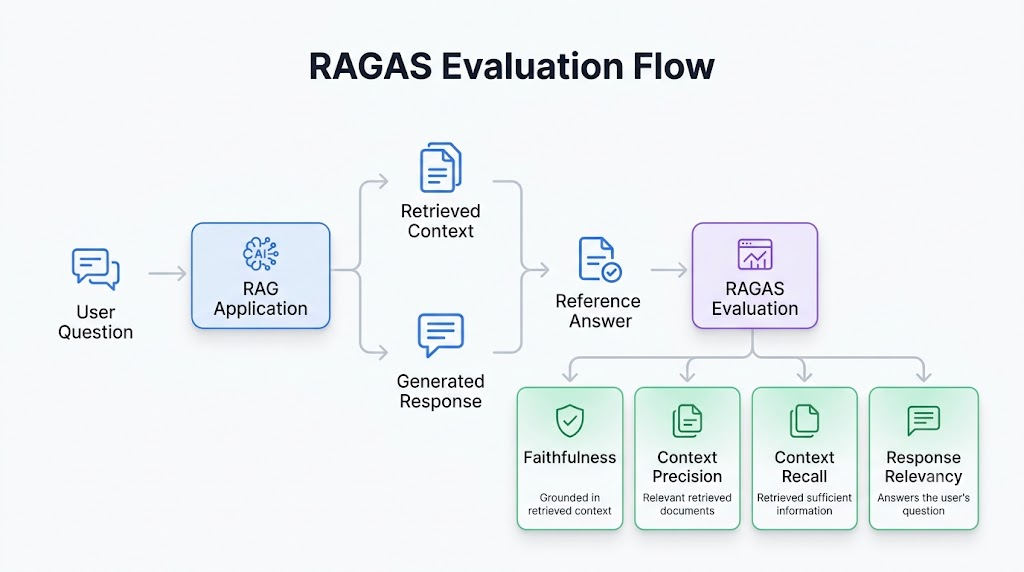
RAGAS (Retrieval-Augmented Generation Assessment) is a free evaluation framework tailored for RAG applications. Unlike a mere text quality measurement, RAGAS measures the whole retrieval-generation pipeline.
It takes a look at several aspects of your system, such as:
- Whether retrieved documents have the information needed to answer the question.
- If the generated response is related to the retrieved context.
- If the retrieved context is relevant to the user’s query or not.
- Whether the answer to the question actually is the content of the final answer.
Unlike other NLP quality measures like BLEU, ROUGE, or exact-match accuracy, RAGAS recognizes that a RAG system has two separate components – Retrieval and Generation – which are both interconnected.
The information is located – retrieval.
Generation – Ability to produce the correct answer based on that information.
In the event of either stage failing it is the overall quality of the system that is compromised as a result. RAGAS makes it much easier to improve your application as it helps to identify which component is responsible.
Refer to the official RAGAS documentation
Why Use RAGAS?
What if you could ask your RAG app:
The most basic question is: What is Quantum Computing?
Retriever’s return documents are:
- Quantum Computing –> Correct
- Artificial Intelligence –> Correct
- NASA — Wrong
The language model replies:
Quantum Computing is based on quantum bits, superposition and entanglement of qubits, and makes computation.
The first impression is that the answer is right. There are, however, a number of questions yet to be answered:
- Were the documents retrieved completely sufficient to support the answer?
- Has the retriever brought back too much information?
- Was there a key piece of information that the retriever overlooked?
- Was the answer the correct one to the question asked by the user?
RAGAS can answer such questions.
RAGAS offers objective, quantitative metrics that can be used to evaluate and compare various retrieval strategies, embedding models, chunking techniques, vector databases, language models, and more, and does so in a consistent manner.
| Feature | RAGAS | DeepEval | LangSmith | Phoenix |
| Open Source | ✅ | ✅ | ❌ (Managed Platform) | ✅ |
| Retrieval Metrics | ✅ | Limited | Limited | Partial |
| LLM Evaluation | ✅ | ✅ | ✅ | ✅ |
| Built-in Faithfulness | ✅ | ✅ | ❌ | ❌ |
| Context Precision | ✅ | ❌ | ❌ | ❌ |
| Context Recall | ✅ | ❌ | ❌ | ❌ |
| Experiment Tracking | Limited | Limited | Excellent | Excellent |
| Best For | RAG evaluation | LLM testing | Production monitoring | Observability |
The Four Core RAGAS Metrics
We will assess our RAG pipeline with 4 very popular RAGAS metrics in this tutorial.
1. Faithfulness
checking whether the generated response is backed by the retrieved context.
Suppose that the recovered document reads:
Python is a higher level programming language.
When the model responds:
Python is a high-level programming language for web development and data science.
The added information could be true, but if it was not in the retrieved context then it is considered unsupported by RAGAS. This aids in detecting hallucinations.
A high Faithfulness score means the model is able to remain focused on the documents retrieved rather than adding and creating information.
2. Context Precision
The documents retrieved by Context Precision are ranked according to their relevance.
Suppose you ask:
What is Docker?
The retriever returns:
Docker ✅
Containers ✅
Kubernetes ✅
NASA ❌
SQL ❌
The right document was found, but two other, non-related documents were also found. This decreases the accuracy because the language model could be misled with irrelevant context and so could lead to poorer answers.
High Context Precision is when the retriever brings back primarily pertinent data.
3. Context Recall
The Context Recall is an assessment of whether the retriever could find all the information required to answer the question.
If there is a question that asks for information on the following:
Qubits
Superposition
Entanglement
However, if the retriever only returns the document concerning qubits, then the language model doesn’t have enough information to produce an answer.
High Context Recall means that the retriever has been able to collect all the necessary context.
4. Response Relevancy
Response Relevancy measures the accuracy of the answer provided, in terms of whether it actually answers the user’s question.
Let’s take a look at the example below:
Question
What is Kubernetes?
Answer
Docker is a platform for containerization.
Yes it is technically correct but it is not actually answering the question. Although Docker and Kubernetes are related, the answer is not applicable to the user’s question.
High Response Relevancy score means that the response made by the system is relevant to the query asked by the user.
Setting Up the Environment
Before we create our RAG pipeline we must install the libraries that will be used to power each component of our RAG pipeline.
We have five key technologies as part of our project:
- LangChain for orchestrating the RAG pipeline.
- Hugging Face Sentence Transformers (Vector Embeddings).
- Vector embedding storage and search library, FAISS.
- Groq is a fast and efficient LLM inference engine.
- RAGAS to compare the quality of the RAG system.
The versions used in this tutorial have been tested together to prevent any issues in combining LangChain and RAGAS
Install the Required Libraries
!pip -q install \
ragas==0.2.15 \
langchain==0.3.18 \
langchain-community==0.3.17 \
langchain-core==0.3.34 \
langchain-text-splitters==0.3.6 \
langchain-groq==0.2.4 \
langchain-huggingface \
sentence-transformers \
faiss-cpu \
pandas \
matplotlib
Understanding the Code
Let’s understand why each package is required.
| Library | Purpose |
| ragas | Evaluates the RAG pipeline using multiple quality metrics. |
| langchain | Provides the core framework for building LLM applications. |
| langchain-community | Includes integrations such as the FAISS vector store. |
| langchain-core | Contains the core abstractions like prompts, documents, and chains. |
| langchain-text-splitters | Splits large documents into smaller chunks for retrieval. |
| langchain-groq | Connects LangChain with Groq-hosted language models. |
| langchain-huggingface | Loads Hugging Face embedding models into LangChain. |
| sentence-transformers | Generates semantic vector embeddings for documents. |
| faiss-cpu | Performs efficient similarity search over embeddings. |
| pandas | Organizes and analyzes tabular evaluation results. |
| matplotlib | Creates charts for visualizing evaluation metrics. |
Importing the Required Modules
With the environment ready, the next step is importing the modules that we’ll use throughout the project.
import os
from getpass import getpass

import pandas as pd
import matplotlib.pyplot as plt

from langchain_core.documents import Document
from langchain_core.prompts import ChatPromptTemplate
from langchain_core.output_parsers import StrOutputParser

from langchain_text_splitters import RecursiveCharacterTextSplitter

from langchain_huggingface import HuggingFaceEmbeddings
from langchain_community.vectorstores import FAISS

from langchain_groq import ChatGroq
Understanding the Code
These imports are each used for a particular purpose in our RAG pipeline:
- The os module is used to handle environment variables, which is the case here: we need to safely store the API key.
- getpass allows us to enter into the Groq API key without it appearing on the screen.
- Our knowledge base and our evaluation results are organized in DataFrames using pandas.
- matplotlib is used to help plot out the evaluation metrics in the end of the tutorial.
From LangChain, we import:
- Document as a structured document each knowledge source.
- Using ChatPromptTemplate to set the prompt that will be passed to the language model.
- Use StrOutputParser to convert the model’s answer to plain text.
- Split large documents into smaller chunks that are suitable for retrieval: RecursiveCharacterTextSplitter.
- Using HuggingFaceEmbeddings to create embeddings for semantic search.
- To develop a vector database for support of similarity-based document retrieval, FAISS.
- ChatGroq allows you to talk to Groq language models.
Notice that there is no processing in this cell. We’re just taking all the components of the rest of the notebook with us.
Configuring the Groq Language Model
The answer generation step in the Retrieval-Augmented Generation pipeline is still based on a Large Language Model. For this tutorial, we’ll be utilizing Groq’s hosted Llama 3.3 70B Versatile model, which provides low latency inference capabilities and also works well with LangChain.
Load the Groq Model
os.environ["GROQ_API_KEY"] = getpass("Enter Groq API Key: ")

llm = ChatGroq(
    model="llama-3.3-70b-versatile",
    temperature=0
)

print("Groq LLM Loaded Successfully!")
Understanding the Code
Let’s break down this cell:
- getpass() securely prompts you to enter your Groq API key without displaying it in the notebook.
- The API key is stored as an environment variable so that the Groq client can authenticate future requests.
- ChatGroq() initializes the language model.
- The model parameter specifies the Groq-hosted Llama model used for text generation.
- temperature=0 makes the model’s responses deterministic, which is especially important during evaluation. Using a fixed temperature ensures that the same question consistently produces the same answer, leading to more reliable RAGAS scores.
Expected Output
| Groq LLM Loaded Successfully! |
If you see this message without any errors, your notebook is successfully connected to Groq, and the language model is ready to generate responses.
Create the Knowledge Base
knowledge_base = [
    {
        "title": "Python",
        "content": """Python is a high-level programming language known for its readability, simplicity,
        and large ecosystem of libraries. It supports procedural,
        object-oriented and functional programming."""
    },

    {
        "title": "Artificial Intelligence",
        "content": """Artificial Intelligence is the field of computer science
        focused on building systems capable of reasoning, learning,
        planning and decision making."""
    },

    {
        "title": "Machine Learning",
        "content": """Machine Learning is a subset of Artificial Intelligence
        where algorithms learn patterns from data without explicit programming."""
    },

    {
        "title": "Deep Learning",
        "content": """Deep Learning is a subset of Machine Learning
        based on neural networks with multiple hidden layers."""
    },

    {
        "title": "Quantum Computing",
        "content": """Quantum Computing uses qubits instead of classical bits.
        Superposition and entanglement allow certain computations
        to be performed much faster than classical computers."""
    },

    {
        "title": "Docker",
        "content": """Docker packages applications into containers,
        making deployment consistent across environments."""
    },

    {
        "title": "Kubernetes",
        "content": """Kubernetes automates deployment,
        scaling and management of containerized applications."""
    },

    {
        "title": "Linux",
        "content": """Linux is an open-source operating system widely used
        in cloud computing, servers and embedded systems."""
    },

    {
        "title": "Git",
        "content": """Git is a distributed version control system
        used to manage source code and collaborate on software projects."""
    },

    {
        "title": "SQL",
        "content": """SQL is a language used to query
        and manage relational databases."""
    },

    {
        "title": "NASA",
        "content": """NASA is the United States agency
        responsible for civilian space exploration
        and aerospace research."""
    },

    {
        "title": "Cloud Computing",
        "content": """Cloud Computing provides computing resources
        such as servers, storage and databases over the Internet."""
    }
]

knowledge_df = pd.DataFrame(knowledge_base)

knowledge_df.head()
Understanding the Code
Our knowledge base is created as a list of Python dictionaries.
Each dictionary represents a single document and contains two fields:
- title – identifies the document.
- content – stores the actual information that will later be indexed and retrieved.
Although we’re manually creating the knowledge base in this tutorial, the same structure can be generated from real-world data sources such as PDFs, CSV files, SQL databases, or web pages. The important idea is that each piece of information becomes an individual document that the retriever can search.
Once the list is created, we convert it into a Pandas DataFrame. This makes the data easier to inspect and manipulate before converting it into LangChain documents.
Expected Output
You should see a table similar to the following:
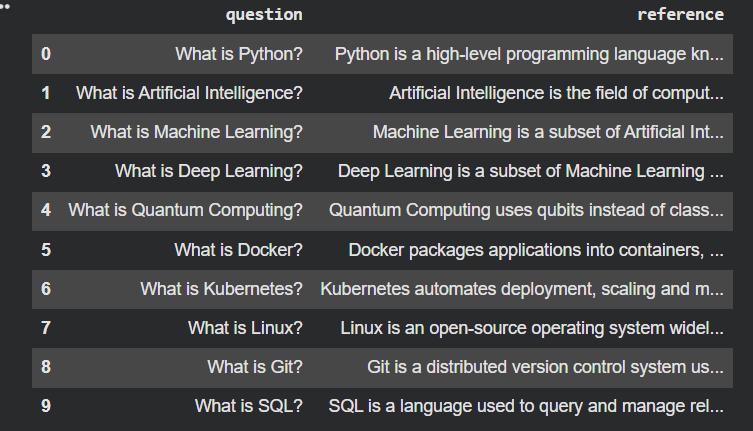
The DataFrame confirms that our knowledge base has been successfully created and is ready for processing.
Converting the Knowledge Base into LangChain Documents
Although our knowledge base is stored inside a DataFrame, LangChain cannot directly process DataFrames during retrieval.
Instead, LangChain represents every document using a dedicated Document object.
Each Document consists of two important components:
- page_content – the actual text that will be embedded and searched.
- metadata – additional information about the document, such as its title, author, source, or file name.
Metadata is particularly useful because it allows us to trace where retrieved information originated.
Convert to Documents
documents = []

for _, row in knowledge_df.iterrows():
    documents.append(
        Document(
            page_content=row["content"],
            metadata={
                "title": row["title"]
            }
        )
    )

print(f"Loaded {len(documents)} documents.")
Understanding the Code
The loop iterates through every row in the DataFrame.
For each row, it creates a LangChain Document object by assigning:
- the document text to page_content
- the title to the document’s metadata
The resulting documents list is simply a collection of LangChain Document objects.
Later, every document will be embedded into vectors and stored inside the vector database.
Expected Output
| Loaded 12 documents. |
This tells us that all twelve entries from our knowledge base have been successfully converted into LangChain documents.
Why Do We Split Documents?
A very common mistake beginners make when creating their RAG is to embed an entire document without breaking it up.
Suppose you could make a 20-page PDF an embedded file within a single document. Suppose you could include a 20-page PDF file as a single file in a document.
Suppose some user asks:
What is Docker?
If the answer is found on page 18 the retriever is still to send back the whole 20 page document.
This poses a number of issues:
- Language model is given more irrelevant context.
- Recall lessens in accuracy.
- The amount of tokens that can be used grows much more.
- The language model can go ‘off-topic’.
- Rather, we break a large document into smaller segments.
The retriever then goes through hundreds or thousands of small pieces versus a few large documents.
It will significantly enhance the quality of retrieval.
Splitting the Documents
We’ll use LangChain’s RecursiveCharacterTextSplitter, one of the most commonly used text splitters for RAG applications.
Split the Documents
splitter = RecursiveCharacterTextSplitter(
    chunk_size=250,
    chunk_overlap=50
)

chunks = splitter.split_documents(documents)

print(f"Created {len(chunks)} chunks.")
Understanding the Code
The RecursiveCharacterTextSplitter divides each document into smaller pieces.
Two parameters control the behavior:
chunk_size
This specifies the maximum number of characters allowed in each chunk.
| chunk_size=250 |
A smaller chunk generally improves retrieval precision because each chunk focuses on a single topic.
chunk_overlap
| chunk_overlap=50 |
This determines how many characters are shared between consecutive chunks.
Why is overlap important?
Suppose one chunk ends with:
“…Machine Learning is a subset…”
and the next begins with:
“…of Artificial Intelligence…”
Without overlap, important context might be split between chunks, making retrieval less effective.
By overlapping 50 characters, both chunks retain part of the surrounding context, improving semantic search and reducing information loss.
Expected Output
| Created 12 chunks. |
In this example, each document is already quite small, so each one becomes a single chunk.
In a real-world application with PDFs or lengthy reports, hundreds or even thousands of chunks may be created.
Creating Vector Embeddings
So far, all of our documents are plain text. Humans can readily grasp the meaning of text, but computers can’t directly tell if two pieces of text have the same meaning.
Here are two questions to consider, for instance:
What is Artificial Intelligence?
and
Explain AI.
Both question types ask for the same information, but use different words. A traditional keyword search engine would recognize them as two separate queries, whereas a semantic search engine understands that both of the questions mean the same.
This is accomplished due to the embedding models that are used today, which produce dense numerical vectors known as embeddings from text.
Rather than the text being represented as words, embeddings represent the meaning of the text in a high dimensional space which is mathematical. Similar meaning texts are grouped together, unrelated texts are grouped separately.
This change makes it possible to perform semantic search so that the retriever can find relevant information despite variations in the wording.
Loading the Embedding Model
For this tutorial, we’ll use the all-MiniLM-L6-v2 model from Hugging Face.
This is one of the most widely used embedding models because it offers an excellent balance between speed, accuracy, and computational efficiency.
Load the Embedding Model
embedding_model = HuggingFaceEmbeddings(
    model_name="sentence-transformers/all-MiniLM-L6-v2"
)

print("Embedding model loaded successfully!")
Understanding the Code
The HuggingFaceEmbeddings class loads a pre-trained Sentence Transformer model, which can be used to embed text into a vector.
model_name=”sentence-transformers/all-MiniLM-L6-v2″
This defines the embedding model to download.
The model has been trained to generate semantically meaningful vector representations: that is, texts with similar meanings end up being close together in vector space.
For example,
Python is a computer programming language. and The software is programmed in Python. will produce embeddings much more similar than NASA research is out of this world. This is the power of modern RAG systems compared to the old keyword search.
Expected Output
| Embedding model loaded successfully! |
If this message appears without errors, the embedding model has been successfully loaded and is ready to convert documents into vectors.
Building the Vector Database
Now that we have an embedding model, we can convert every document chunk into a numerical vector.
However, storing thousands or even millions of vectors inside a regular Python list would make searching extremely slow.
Instead, we use a vector database.
A vector database stores embeddings in a structure optimized for similarity search.
Rather than searching for exact words, it searches for the vectors that are mathematically closest to the user’s query.
In this article, we’ll use FAISS (Facebook AI Similarity Search), one of the most popular open-source vector databases.
Creating the FAISS Index
vectorstore = FAISS.from_documents(
    documents=chunks,
    embedding=embedding_model
)

print(f"Indexed {len(chunks)} document chunks.")
Understanding the Code
Let’s examine what happens behind the scenes.
Step 1
Every document chunk is passed to the embedding model.
Chunk
↓
Embedding Model
↓
384-dimensional vector
Each chunk becomes a dense numerical vector representing its meaning.
Step 2
The generated vectors are stored inside a FAISS index.
Conceptually, the process looks like this:
| Document Chunk ↓ Embedding ↓ Vector ↓ FAISS Index |
Instead of searching through text directly, FAISS searches through vectors, making retrieval significantly faster and more accurate.
Why FAISS?
FAISS offers several advantages:
- Extremely fast nearest-neighbor search.
- Efficient memory usage.
- Scales to millions of embeddings.
- Integrates seamlessly with LangChain.
- Completely open source.
These qualities make it one of the most widely used vector databases in research and production environments.
Expected Output
Indexed 12 document chunks.
Since our knowledge base contains twelve small documents, the FAISS index stores twelve vector embeddings.
In larger applications, this number may reach hundreds of thousands or even millions of vectors.
Creating the Retriever
The vector database stores embeddings, but it doesn’t automatically answer user questions. That responsibility belongs to the retriever. The retriever receives a user’s question, converts it into an embedding, compares it with every vector stored inside FAISS, and returns the most similar document chunks. This process is called semantic retrieval.
Building the Retriever
retriever = vectorstore.as_retriever(
    search_kwargs={"k": 3}
)

print("Retriever created successfully!")
Understanding the Code
The as_retriever() method converts the FAISS vector database into a retriever object.The parameter
search_kwargs={“k”:3}
controls how many documents should be returned.
Here,
k = 3
means the retriever will return the three most relevant document chunks for every user query.
Choosing the right value for k is important.
If k is too small:
- Important information may be missed.
- Context Recall decreases.
If k is too large:
- Irrelevant documents may be retrieved.
- Context Precision decreases.
- More tokens are sent to the LLM.
Finding the optimal value depends on the size and complexity of the knowledge base.
Expected Output
| Retriever created successfully! |
This confirms that the retriever is ready to perform semantic searches over the FAISS index.
Testing Semantic Retrieval
Before involving the language model, it’s important to verify that retrieval is working correctly.
A common mistake when building RAG systems is assuming that the retriever is functioning properly without testing it independently. If retrieval fails, even the most capable language model cannot produce accurate answers because it receives incorrect or incomplete context.
Testing retrieval first helps isolate potential issues early in the development process.
Retrieve Relevant Documents
query = "What is Quantum Computing?"

retrieved_docs = retriever.invoke(query)

print(f"Retrieved {len(retrieved_docs)} documents\n")

for i, doc in enumerate(retrieved_docs, 1):
    print(f"Document {i}")
    print("-" * 60)
    print("Title:", doc.metadata["title"])
    print(doc.page_content)
    print()
Understanding the Code
This cell performs the complete retrieval process.
- The user query is converted into an embedding.
- FAISS compares this embedding against every stored document embedding.
- The retriever identifies the three most similar vectors.
- The corresponding document chunks are returned.
Notice that no language model is involved yet. We are simply verifying that semantic search is retrieving relevant information.
This separation is an important debugging strategy. If retrieval works correctly but the generated answers are poor, the issue likely lies with the prompt or language model rather than the vector database.
Expected Output
You should see output similar to:
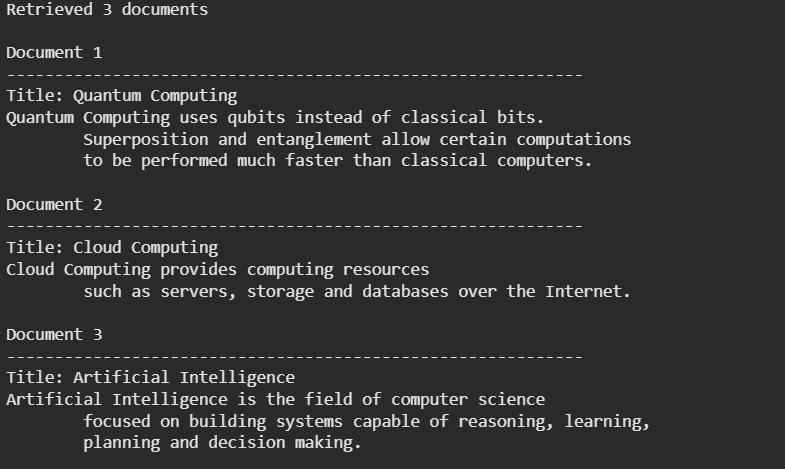
The exact order of the documents may vary slightly depending on the embedding model and similarity scores. However, “Quantum Computing” should appear as the top result because it is the most relevant document for the query.
Building the RAG Pipeline
A retriever alone can only find relevant documents—it cannot generate answers. Similarly, a Large Language Model can generate fluent responses but lacks access to your external knowledge base.
The power of a RAG system comes from combining these two components:
- The retriever searches the knowledge base and identifies the most relevant information.
- The language model uses that retrieved information to generate an accurate, context-aware response.
This process allows the LLM to answer questions using information outside of its training data while reducing the likelihood of hallucinations.
The overall workflow looks like this:
| User Question │ ▼ Retriever │ ▼ Relevant Documents │ ▼ Prompt Template │ ▼ Large Language Model │ ▼ Generated Answer |
Rather than asking the LLM to answer from memory, we provide it with carefully retrieved context, ensuring that the response is grounded in relevant information.
Creating the Prompt Template
The prompt acts as the bridge between the retriever and the language model. It tells the LLM how to use the retrieved documents when generating a response.
A well-designed prompt is essential because it influences how faithfully the model follows the provided context.
Define the Prompt
prompt = ChatPromptTemplate.from_template("""
Answer the question ONLY using the provided context.

Context:
{context}

Question:
{question}

Answer:
""")
Understanding the Code
The ChatPromptTemplate allows us to create a reusable prompt with placeholders that will be filled dynamically during execution.
The template contains two variables:
- {context} – the documents retrieved from the vector database.
- {question} – the user’s query.
Each time a user asks a question, LangChain automatically replaces these placeholders with the appropriate values.
One important instruction in this prompt is:
“Answer the question ONLY using the provided context.”
This encourages the language model to rely on the retrieved documents rather than generating information from its internal knowledge. While this instruction cannot completely eliminate hallucinations, it significantly improves the grounding of responses and leads to more reliable evaluation results.
Formatting the Retrieved Documents
The retriever returns a list of Document objects, but the language model expects plain text. Before passing the retrieved documents to the prompt, we need to combine them into a single text block.
Create a Formatting Function
def format_docs(docs):
    return "\n\n".join(doc.page_content for doc in docs)
Understanding the Code
The function accepts a list of retrieved documents. For each document, it extracts the page_content and joins all retrieved texts into one string, separating them with blank lines.
For example, if the retriever returns three documents:
Python is a programming language. Machine Learning is a subset of AI. Docker is a container platform. The language model receives them as one continuous context block inside the prompt. Without this formatting step, the LLM would receive complex Document objects instead of readable text, resulting in an error.
Building the RAG Chain
Create the Chain
parser = StrOutputParser()

rag_chain = (
    {
        "context": retriever | format_docs,
        "question": lambda x: x
    }
    | prompt
    | llm
    | parser
)
Understanding the Code
Let’s break the chain into its individual stages.
Step 1: Receive the User Question
The chain begins with the user’s input.
For example:
What is Quantum Computing?
Step 2: Retrieve Relevant Documents
| “context”: retriever | format_docs |
The question is passed to the retriever, which searches the FAISS vector database for the most relevant document chunks.
Those documents are then passed through the format_docs() function to create a single text block.
Step 3: Preserve the Original Question
| “question”: lambda x: x |
The same user question is forwarded unchanged so that it can be inserted into the prompt alongside the retrieved context.
Step 4: Generate the Prompt
The prompt template combines:
- the retrieved context
- the user’s question
into a complete prompt ready for the language model.
Step 5: Generate the Answer
| | llm |
The prompt is sent to the Groq-hosted Llama model, which generates a response based on the supplied context.
Step 6: Parse the Output
| | parser |
The language model returns an AI message object. StrOutputParser extracts only the textual response, making it easier to display and process.
The complete pipeline can be visualized as follows:
| User Question │ ▼ Retriever │ ▼ Relevant Documents │ ▼ format_docs() │ ▼ Prompt Template │ ▼ Groq LLM │ ▼ StrOutputParser │ ▼ Final Answer |
Testing the RAG Pipeline
Before evaluating our system with RAGAS, it’s important to confirm that the RAG pipeline is functioning correctly.
We’ll ask the model a simple question and inspect the generated response.
Ask a Question
question = "What is Quantum Computing?"

response = rag_chain.invoke(question)

print(response)
Understanding the Code
The invoke() method executes the entire pipeline from start to finish.
Behind the scenes, the following sequence occurs:
- The user’s question is embedded.
- The retriever searches the FAISS vector database.
- The top three relevant document chunks are retrieved.
- Those chunks are formatted into plain text.
- The prompt is assembled using the retrieved context and the user’s question.
- The prompt is sent to the Groq language model.
- The generated response is returned as plain text.
All of these steps are executed automatically through the chain, allowing us to interact with the RAG system using a single function call.
Expected Output
Your output should be similar to:
| Quantum Computing is a type of computing that uses qubits instead of classical bits. It leverages principles such as superposition and entanglement, allowing certain computations to be performed much faster than classical computers. The exact wording may vary slightly depending on the language model, but the answer should clearly reference the retrieved information about qubits, superposition, and entanglement. This confirms that the retriever is supplying relevant context and that the language model is generating responses grounded in that context. |
Evaluating the RAG Pipeline with RAGAS
Creating the Evaluation Dataset
An evaluation dataset consists of a collection of questions along with their expected (reference) answers.
Each question will be passed through our RAG pipeline, allowing us to compare:
- the original question,
- the generated answer,
- the retrieved documents, and
- the expected answer.
This structured data enables RAGAS to calculate evaluation metrics automatically.
Create the Evaluation Data
evaluation_data = [
    {
        "question": "What is Python?",
        "reference": "Python is a high-level programming language known for readability and supporting procedural, object-oriented, and functional programming."
    },
    {
        "question": "What is Artificial Intelligence?",
        "reference": "Artificial Intelligence is the field of computer science focused on building systems capable of reasoning, learning, planning, and decision making."
    },
    {
        "question": "What is Machine Learning?",
        "reference": "Machine Learning is a subset of Artificial Intelligence where algorithms learn patterns from data without explicit programming."
    },
    {
        "question": "What is Deep Learning?",
        "reference": "Deep Learning is a subset of Machine Learning based on neural networks with multiple hidden layers."
    },
    {
        "question": "What is Quantum Computing?",
        "reference": "Quantum Computing uses qubits instead of classical bits and leverages superposition and entanglement."
    },
    {
        "question": "What is Docker?",
        "reference": "Docker packages applications into containers for consistent deployment."
    },
    {
        "question": "What is Kubernetes?",
        "reference": "Kubernetes automates deployment, scaling, and management of containerized applications."
    },
    {
        "question": "What is Linux?",
        "reference": "Linux is an open-source operating system widely used in servers and cloud computing."
    },
    {
        "question": "What is Git?",
        "reference": "Git is a distributed version control system used to manage source code."
    },
    {
        "question": "What is SQL?",
        "reference": "SQL is a language used to query and manage relational databases."
    }
]

evaluation_df = pd.DataFrame(evaluation_data)
evaluation_df
Understanding the Code
The evaluation dataset is stored as a list of dictionaries.
Each dictionary contains two fields:
Question
The question that will be asked to our RAG system.
For example:
What is Docker?
Reference
The expected answer for that question.
Docker packages applications into containers for consistent deployment. The reference answer serves as the benchmark against which the generated response will be evaluated.
Unlike traditional accuracy tests, the generated answer does not need to exactly match the reference word-for-word. RAGAS evaluates semantic similarity and grounding rather than exact string matching.
Finally, we convert the dataset into a Pandas DataFrame so it can be easily inspected and processed.
Expected Output
You should see a table similar to the following:
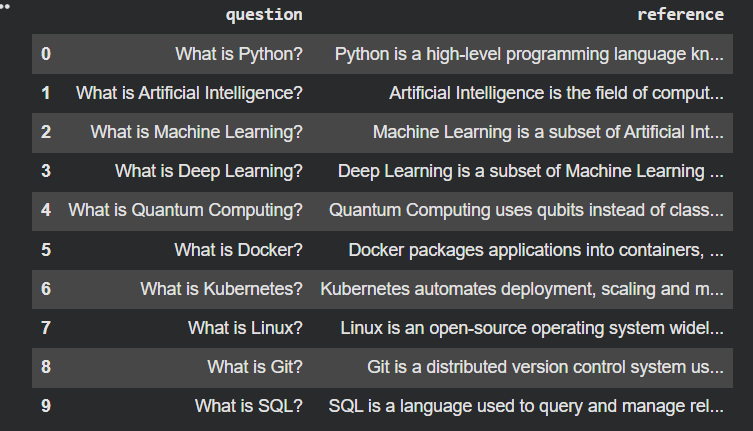
Generating Responses for Every Question
Now that we have our evaluation questions, the next step is to let our RAG system answer each one.
For every question, we need to collect three pieces of information:
- The generated answer.
- The retrieved context.
- The reference answer.
Together, these form the complete evaluation record that RAGAS requires.
Generate the Responses
results = []

for _, row in evaluation_df.iterrows():

    question = row["question"]

    retrieved_docs = retriever.invoke(question)

    contexts = [doc.page_content for doc in retrieved_docs]

    answer = rag_chain.invoke(question)

    results.append({
        "question": question,
        "reference": row["reference"],
        "answer": answer,
        "contexts": contexts
    })

results_df = pd.DataFrame(results)

results_df.head()
Understanding the Code
This loop automates the evaluation process.
For every question in our evaluation dataset:
Step 1
The retriever searches the FAISS vector database.
| retriever.invoke(question) |
This returns the most relevant document chunks.
Step 2
The retrieved documents are converted into a list of text strings.
| contexts = [doc.page_content for doc in retrieved_docs] |
RAGAS expects the retrieved context in plain text rather than as LangChain Document objects.
Step 3
The question is passed through the complete RAG pipeline.
| answer = rag_chain.invoke(question) |
This generates the final response using the retrieved context.
Step 4
All components are stored together.
Each evaluation sample now contains:
- User question
- Reference answer
- Generated answer
- Retrieved context
These records will later be transformed into the format expected by RAGAS.
Expected Output
Your DataFrame should contain four columns:

The exact wording of the generated answers may differ slightly because they are produced by the language model. However, they should remain grounded in the retrieved context.
Preparing the Dataset for RAGAS
Although our evaluation DataFrame contains all the required information, RAGAS cannot evaluate it directly.
Instead, RAGAS expects the data to be organized using its own data structures. Specifically, each evaluation sample must be represented as a SingleTurnSample, and all samples must be grouped into an EvaluationDataset. This standardized format allows RAGAS to process each question consistently across all evaluation metrics.
Create the RAGAS Dataset
from ragas import EvaluationDataset
from ragas.dataset_schema import SingleTurnSample

evaluation_dataset = EvaluationDataset(
    samples=[
        SingleTurnSample(
            user_input=row["question"],
            response=row["answer"],
            retrieved_contexts=row["contexts"],
            reference=row["reference"]
        )
        for _, row in results_df.iterrows()
    ]
)

print("Evaluation dataset created successfully!")
Understanding the Code
Each row in results_df is converted into a SingleTurnSample.
A SingleTurnSample represents one complete interaction between the user and the RAG system.
It contains:
- user_input – the original question.
- response – the answer generated by the RAG pipeline.
- retrieved_contexts – the documents retrieved from FAISS.
- reference – the expected answer.
All of these samples are then grouped into an EvaluationDataset, which becomes the input to the RAGAS evaluation engine.
Expected Output
Evaluation dataset created successfully!
This confirms that the dataset has been successfully converted into the format required by RAGAS.
Creating the RAGAS Wrappers
from ragas.llms import LangchainLLMWrapper
from ragas.embeddings import LangchainEmbeddingsWrapper

evaluator_llm = LangchainLLMWrapper(llm)

evaluator_embeddings = LangchainEmbeddingsWrapper(
    embedding_model
)
Understanding the Code
Two wrapper objects are created in this step.
LangchainLLMWrapper
| evaluator_llm = LangchainLLMWrapper(llm) |
This wrapper allows RAGAS to use our Groq language model for evaluation.
Some RAGAS metrics require an LLM to judge whether a generated answer is faithful to the retrieved context or whether it adequately answers the user’s question.
Instead of creating a new language model, we simply wrap the one that already powers our RAG application.
LangchainEmbeddingsWrapper
| evaluator_embeddings = LangchainEmbeddingsWrapper( embedding_model ) |
Certain metrics compare the semantic similarity between pieces of text.
To perform these comparisons, RAGAS requires access to an embedding model.
This wrapper allows RAGAS to reuse the same Hugging Face embedding model that we used when building our vector database.
Using the same embedding model throughout the pipeline ensures consistency between retrieval and evaluation.
Why Are Wrappers Necessary?
A common question beginners ask is:
Why can’t we simply pass the LangChain models directly to RAGAS?
The answer is that LangChain and RAGAS are separate libraries with different internal interfaces. The wrappers translate LangChain objects into the format expected by RAGAS.
Without these wrappers, RAGAS would not know how to interact with the language model or embedding model, resulting in compatibility errors.
Evaluating Faithfulness
The first metric we’ll evaluate is Faithfulness.
Faithfulness measures whether the generated response is supported by the retrieved context.
This is one of the most important metrics because a RAG system should answer questions using the retrieved documents—not by inventing information.
If the generated answer contains facts that are not present in the retrieved context, the Faithfulness score decreases.
A high Faithfulness score indicates that the model remains grounded in the retrieved documents.
Create the Faithfulness Metric
from ragas.metrics import Faithfulness

faithfulness = Faithfulness(
    llm=evaluator_llm
)
Run the Evaluation
from ragas import evaluate

faithfulness_scores = evaluate(
    dataset=evaluation_dataset,
    metrics=[faithfulness]
)

faithfulness_scores.to_pandas()
Understanding the Code
The evaluate() function is the core evaluation engine provided by RAGAS.
It accepts two inputs:
- the evaluation dataset
- one or more evaluation metrics
Since we’re evaluating only Faithfulness at this stage, we pass a list containing a single metric.
RAGAS automatically processes every sample in the dataset and computes a Faithfulness score for each generated response.
Expected Output
Your output will look similar to the following:
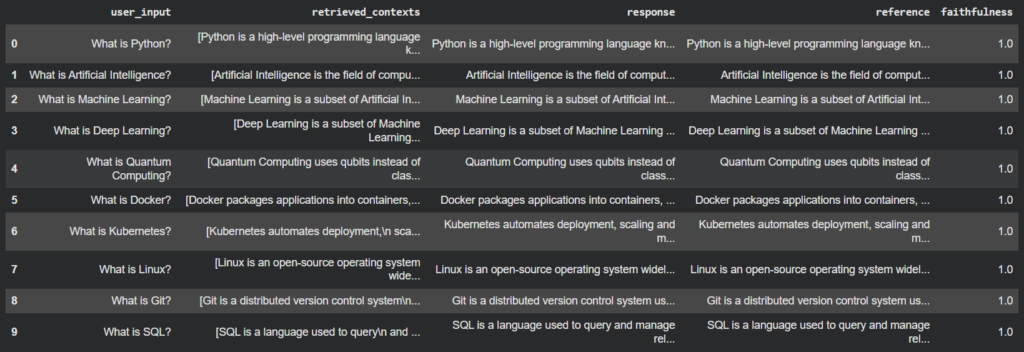
Interpreting the Results
Faithfulness scores range from 0 to 1.
| Score | Interpretation |
| 1.0 | The generated answer is completely supported by the retrieved context. |
| 0.8 – 0.99 | The answer is mostly grounded, with minor unsupported details. |
| 0.5 – 0.79 | Some information appears unsupported or partially hallucinated. |
| Below 0.5 | The response contains significant hallucinations or is poorly grounded. |
In our notebook, every sample received a score of 1.0 because the knowledge base was intentionally small and each answer closely matched the retrieved context.
In real-world applications, lower Faithfulness scores often indicate that the language model is introducing information beyond what was retrieved.
Evaluating Context Precision
The second metric is Context Precision.
A retriever should return only the documents that are relevant to the user’s question.
If it retrieves unnecessary or unrelated documents, the language model receives noisy context, which can negatively affect the quality of generated answers.
Context Precision measures how much of the retrieved information is actually useful.
Create the Context Precision Metric
from ragas.metrics import LLMContextPrecisionWithReference

context_precision = LLMContextPrecisionWithReference(
    llm=evaluator_llm
)
Understanding the Code
Context Precision reuses the same LLM wrapper configured earlier to measure how relevant the retrieved context is to the reference answer.
Run the Evaluation
context_precision_scores = evaluate(
    dataset=evaluation_dataset,
    metrics=[context_precision]
)

context_precision_scores.to_pandas()
Expected Output
The resulting DataFrame contains a new column named:
| context_precision |
Each row receives a score between 0 and 1.
Higher scores indicate that the retriever returned mostly relevant documents with minimal irrelevant information.
Evaluating Context Recall
Precision tells us whether retrieved documents are relevant.
Recall answers a different question:
Did we retrieve enough relevant information?
Even if every retrieved document is relevant, important information might still be missing.
Context Recall measures whether the retriever successfully gathered all the context needed to answer the user’s question.
Create the Context Recall Metric
from ragas.metrics import LLMContextRecall

context_recall = LLMContextRecall(
    llm=evaluator_llm
)
Run the Evaluation
context_recall_scores = evaluate(
    dataset=evaluation_dataset,
    metrics=[context_recall]
)

context_recall_scores.to_pandas()
Understanding the Results
A high Context Recall score indicates that the retriever successfully retrieved all the information necessary to answer the question.
Low scores generally suggest:
- the chunk size may be too small,
- the retriever returned too few documents,
- or the embedding model failed to identify relevant chunks.
Evaluating Response Relevancy
The final metric evaluates the quality of the generated answer itself.
Even if the retrieved documents are correct, the language model may produce an answer that is incomplete or fails to address the user’s question.
Response Relevancy measures how directly the generated response answers the original query.
Create the Response Relevancy Metric
from ragas.metrics import ResponseRelevancy

response_relevancy = ResponseRelevancy(
    llm=evaluator_llm,
    embeddings=evaluator_embeddings
)
Understanding the Code
Unlike the previous metrics, Response Relevancy requires both:
- the language model wrapper
- the embedding model wrapper
The language model analyzes the generated response, while the embedding model helps measure semantic similarity between the user’s question and the generated answer.
Run the Evaluation
response_relevancy_scores = evaluate(
    dataset=evaluation_dataset,
    metrics=[response_relevancy]
)

response_relevancy_scores.to_pandas()
Understanding the Results
Response Relevancy scores also range from 0 to 1.
A high score indicates that the generated answer directly addresses the user’s question.
Lower scores often indicate that the model:
- partially answered the question,
- provided unnecessary information,
- or misunderstood the user’s intent.
Why Evaluate Metrics Individually?
Throughout this tutorial, we evaluated each metric separately rather than all at once.
This approach offers two important advantages:
- Simpler debugging: If an error occurs, it’s much easier to identify which metric or configuration caused the problem.
- Better understanding: Evaluating metrics individually helps you understand what each metric measures before combining them into a comprehensive evaluation.
Once you’ve verified that each metric works correctly, you can evaluate them together to obtain a complete picture of your RAG system’s performance.
Running All RAGAS Metrics Together
Earlier, we evaluated each metric individually to better understand what it measures and to simplify debugging.
In a real-world evaluation pipeline, however, you’ll typically evaluate all metrics in a single run. This provides a comprehensive view of your RAG system’s performance and makes it easier to compare different retrievers, embedding models, prompts, or language models.
Instead of running four separate evaluations, RAGAS allows us to compute all metrics simultaneously.
Evaluating All Metrics
all_scores = evaluate(
    dataset=evaluation_dataset,
    metrics=[
        faithfulness,
        context_precision,
        context_recall,
        response_relevancy
    ]
)
Converting the Results into a DataFrame
The evaluation results are returned as a RAGAS object.
To analyze them more easily, we convert the results into a Pandas DataFrame.
final_results = all_scores.to_pandas()

final_results.head()
Understanding the Code
The to_pandas() method transforms the evaluation results into a structured table.
Each row represents one evaluation sample, while each column corresponds to a specific metric.
This makes it easy to:
- inspect individual samples,
- identify weak responses,
- filter low-scoring questions,
- export the results to CSV,
- or create visualizations.
Expected Output
Your DataFrame should look similar to the following:
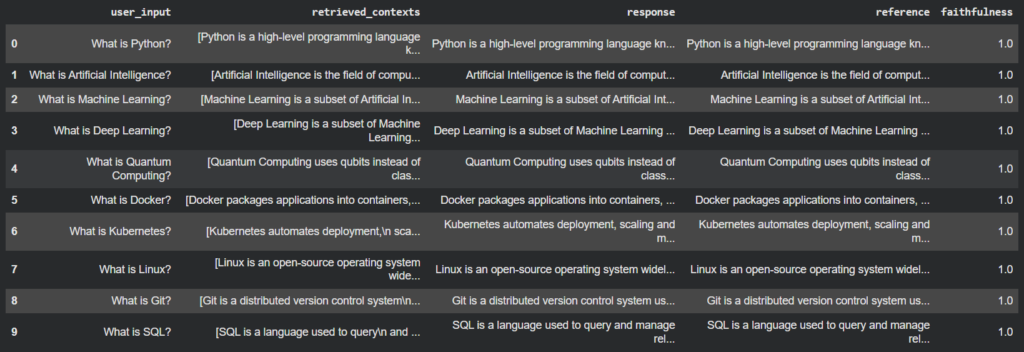
The exact values may differ slightly depending on the language model and evaluation environment.
Computing the Average Score
While individual scores help identify problematic examples, it is often useful to summarize the overall performance of the RAG system.
We’ll calculate the average score for each evaluation metric.
summary = pd.DataFrame({
    "Metric": [
        "Faithfulness",
        "Context Precision",
        "Context Recall",
        "Response Relevancy"
    ],
    "Average Score": [
        final_results["faithfulness"].mean(),
        final_results["context_precision"].mean(),
        final_results["context_recall"].mean(),
        final_results["answer_relevancy"].mean()
    ]
})

summary
Understanding the Code
This cell computes the mean value of each metric across all evaluation samples.
For example:
final_results["faithfulness"].mean()calculates the average Faithfulness score across every question in the evaluation dataset.
The resulting summary table provides a quick overview of the overall quality of the RAG pipeline.
Expected Output
| Metric | Average Score |
| Faithfulness | 1.00 |
| Context Precision | 0.99 |
| Context Recall | 1.00 |
| Response Relevancy | 0.98 |
These averages make it much easier to compare different versions of your RAG system.
For example, if you change the embedding model or adjust the chunk size, you can rerun the evaluation and compare the average scores before and after the change.
Visualizing the Evaluation Results
Numbers are informative, but visualizations make it much easier to identify strengths and weaknesses at a glance.
We’ll create a simple bar chart showing the average score for each metric.
plt.figure(figsize=(8,5))

plt.bar(
    summary["Metric"],
    summary["Average Score"]
)

plt.ylim(0,1.05)

plt.title("Average RAGAS Scores")
plt.ylabel("Score")

plt.show()
Understanding the Code
The chart uses the summary DataFrame created earlier.
Each bar represents the average value of one evaluation metric.
The y-axis ranges from 0 to 1 because every RAGAS metric is normalized within this interval.
Visualizations like this are particularly useful when comparing multiple experiments, such as different embedding models, retrievers, or prompting strategies.
Expected Output
The resulting chart displays four bars:
- Faithfulness
- Context Precision
- Context Recall
- Response Relevancy
Higher bars indicate stronger performance.
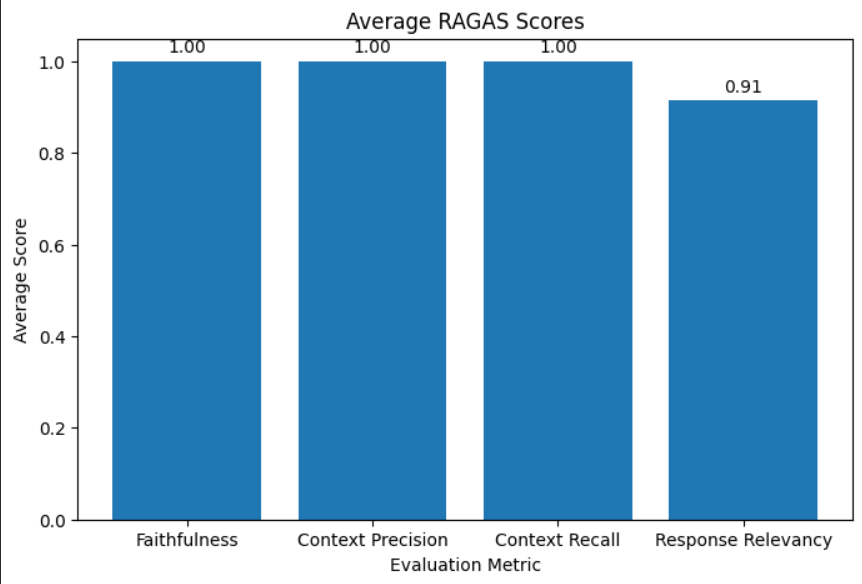
If one metric is noticeably lower than the others, it often points to the area of the RAG pipeline that requires improvement.
Highlighting Low-Scoring Responses
Average scores provide a useful overview, but they can sometimes hide individual failures.
For example, a Faithfulness average of 0.95 might still include a few responses with scores below 0.60.
To identify these cases, we can filter the evaluation results using a score threshold.
threshold = 0.80

low_scores = final_results[
    (final_results["faithfulness"] < threshold) |
    (final_results["context_precision"] < threshold) |
    (final_results["context_recall"] < threshold) |
    (final_results["answer_relevancy"] < threshold)
]

low_scores
Understanding the Code
This cell will show only the responses that failed to achieve a score of 0.80 or greater in one or more of the metrics in the evaluation DataFrame.
One of the best ways to enhance a RAG system would be to go over the low-scoring samples.
You can look at a sample to see if the problem is:
- poor document chunking,
- A weak embedding approach,
- incorrect retrieval,
- or the language model itself.
Interpreting the Final Results
Once you have considered your RAG system, you need to know what each of the scores represents.
There is no fixed threshold, but the following guideline is used:
| Score Range | Interpretation |
| 0.90 – 1.00 | Excellent performance. The retrieval and generation components are working very well. |
| 0.80 – 0.89 | Very good performance. Some minor improvements could still be made. |
| 0.70 – 0.79 | Satisfactory performance, but there are some parts of the pipeline which can be optimized. |
| Below 0.70 | There is a need for a lot of improvement. . Investigate retrieval quality, chunking strategy, prompt design, or language model behavior. |
It’s important to evaluate the metrics together rather than in isolation.
For example:
- High Faithfulness but low Context Recall indicates that the model is correctly recalling the information, but the retriever has not included the important documents.
- High Context Recall but low Context Precision means that the retriever is able to retrieve relevant information but too much of irrelevant context.
- If a high retrieval score is coupled with low Response Relevancy, it could be a problem with the prompt or language model and not the retriever.
- When all of the metrics are reviewed, a more realistic picture will emerge of the strengths and weaknesses of your system.
Looking at the complete set of metrics provides a more accurate understanding of your system’s strengths and weaknesses.
Common Issues and Troubleshooting
Issue 1: OpenAI API Key Error
Error
OpenAIError:
The api_key client option must be set either by passing api_key
to the client or by setting the OPENAI_API_KEY environment variable.
Why It Happens
Many RAGAS metrics internally use an LLM for evaluation.
If an LLM wrapper is not explicitly provided, RAGAS attempts to use its default configuration, which may expect an OpenAI model. As a result, it searches for an OPENAI_API_KEY, even if your RAG pipeline uses Groq or another provider.
Solution
Wrap your LangChain language model before passing it to RAGAS.
from ragas.llms import LangchainLLMWrapper

evaluator_llm = LangchainLLMWrapper(llm)
Then create the metric using this wrapper.
faithfulness = Faithfulness(
    llm=evaluator_llm
)
Providing the wrapper ensures that RAGAS uses your configured language model instead of falling back to its default behavior.
Issue 2: Embedding Model Not Provided
Error
ValueError:
Embeddings must be provided.
Why It Happens
Metrics such as Response Relevancy rely on semantic similarity calculations between the question and the generated response.
To perform these calculations, RAGAS requires access to an embedding model.
Solution
Wrap the Hugging Face embedding model.
from ragas.embeddings import LangchainEmbeddingsWrapper

evaluator_embeddings = LangchainEmbeddingsWrapper(
    embedding_model
)
Then initialize the metric with both the language model and embedding wrapper.
response_relevancy = ResponseRelevancy(
    llm=evaluator_llm,
    embeddings=evaluator_embeddings
)
Issue 3: Incorrect Library Versions
Symptoms
You may encounter errors such as:
ImportError
AttributeError
Unexpected keyword argument
or
ModuleNotFoundError
Why It Happens
LangChain and RAGAS are actively developed libraries. Changes introduced in newer releases may modify class names, import paths, or function signatures.
Using incompatible versions can prevent the notebook from running correctly.
Solution
Use the same package versions throughout the tutorial.
ragas==0.2.15
langchain==0.3.18
langchain-core==0.3.34
langchain-community==0.3.17
langchain-groq==0.2.4
Pinning library versions ensures reproducibility and minimizes compatibility issues.
Issue 4: Empty Retrieval Results
Problem
The retriever returns:
[]
or retrieves documents that are unrelated to the user’s query.
Why It Happens
Several factors can contribute to poor retrieval performance:
- The embedding model was not loaded correctly.
- The vector database was built using the wrong documents.
- Documents were not split into appropriate chunks.
- The value of k is too small.
- The query differs significantly from the language used in the knowledge base.
Solution
Verify the retriever independently before building the RAG chain.
retrieved_docs = retriever.invoke(
    "What is Quantum Computing?"
)

for doc in retrieved_docs:
    print(doc.metadata["title"])
Testing retrieval in isolation makes it easier to identify whether the issue lies with the retriever or the language model.
Issue 5: Hallucinated Responses
Problem
The language model generates information that is not present in the retrieved context.
Why It Happens
Possible causes include:
- The prompt does not instruct the model to rely on the retrieved documents.
- The retriever returns insufficient context.
- The retrieved documents are unrelated to the question.
- The language model supplements the response using its internal knowledge.
Solution
Use a grounding prompt such as:
Answer the question ONLY using the provided context.
Additionally, monitor the Faithfulness score.
A low Faithfulness score often indicates that the model is generating unsupported information.
Issue 6: Low Context Precision
Symptoms
The retriever returns relevant documents together with several unrelated ones.
For example:
Question:
What is Docker?
Retrieved Documents:
- Docker
- Kubernetes
- NASA
- SQL
Although Docker is retrieved correctly, the additional unrelated documents reduce Context Precision.
Possible Solutions
Improve retrieval quality by:
- Reducing the value of k.
- Using a higher-quality embedding model.
- Improving document chunking.
- Removing duplicate or noisy documents from the knowledge base.
Issue 7: Low Context Recall
Symptoms
The generated answer is incomplete even though the retriever returns relevant documents.
Why It Happens
Important information may not have been retrieved.
Common reasons include:
- Chunk size is too small.
- The retriever returns too few documents.
- Documents were split in a way that separates related information.
Possible Solutions
Try:
- Increasing the chunk size.
- Increasing the number of retrieved documents.
- Using overlapping chunks.
- Experimenting with a different embedding model.
Issue 8: Slow Evaluation
Problem
Evaluating a large dataset takes a long time.
Why It Happens
Several RAGAS metrics rely on language model inference.
If your evaluation dataset contains hundreds or thousands of questions, every metric performs multiple LLM calls, increasing evaluation time.
Possible Solutions
To improve performance:
- Start with a smaller evaluation dataset.
- Evaluate metrics individually during development.
- Use batching where supported.
- Evaluate only the metrics relevant to your current experiment.
Conclusion
One of the most promising methods for developing AI applications capable of generating answers to queries based on external knowledge bases is called Retrieval-Augmented Generation (RAG). RAG systems are more accurate, up-to-date and factually correct than language models because they combine semantic retrieval with LLM.RAG systems are factually correct, up to date and accurate as they combine semantic retrieval with LLM.
But creating a RAG pipeline is just half the job. It is hard to see if the retriever is bringing back the correct documents, if the produced answers are based on the retrieved context, or if the retriever is reliable to retrieve documents. This is where RAGAS comes in extremely handy.
With traditional evaluation metrics that are limited to generated text, RAGAS considers both retrieval and generation in a RAG pipeline. The metrics include Faithfulness, Context Precision, Context Recall, and Response Relevancy, which give a comprehensive view of the quality of information retrieved and answer generated by the system.
We created an end-to-end RAG evaluation workflow in this tutorial with the use of:
- LangChain will be used to orchestrate the RAG pipeline.
- Using Hugging Face Sentence Transformers to get semantic embeddings.
- Similarity search is the vector database used is FAISS.
- FaST Language Model Inference with Groq’s Llama 3.3 70B.
- The complete pipeline will be assessed using RAGAS.
We discussed all the steps of the process, from building a knowledge base and an retriever to generating responses, preparing an evaluation dataset, calculating RAGAS metrics, analyzing the results and troubleshooting some common issues.
The same process can be followed on a production system with thousands of documents. From an internal knowledge assistant to a document search tool, a customer support chatbot to an AI-powered research assistant, RAGAS offers a structured approach to assessing the quality of your RAG pipeline, pinpointing its weaknesses, and enhancing it using data.
The main thing to remember is that: A RAG system is not just about the answers it produces, it should also constantly be assessed to make sure the answers are accurate, relevant and based on the retrieved knowledge.
You can now compare the different retrievers and embedding models, prompt and language models, and feel free to make decisions based upon objective evaluation metrics rather than subjective observations while embedding RAGAS within your development workflow.
Frequently Asked Questions (FAQs)
1. What is RAGAS?
RAGAS (Retrieval-Augmented Generation Assessment) is an open-source assessment framework specifically for the RAG (Retrieval-Augmented Generation) application. Evaluates the quality of both document retrieval and answer generation, enabling developers to understand the strengths and weaknesses of their RAG pipelines.
2. Why should I use RAGAS instead of manually checking responses?
The more questions and documents there are, the more difficult it will become to manually evaluate them. RAGAS can automatically calculate quantitative metrics like Faithfulness, Context Precision, Context Recall, and Response Relevancy, allowing for consistent and reproducible comparisons between various RAG configurations.
3. What is the difference between Faithfulness and Response Relevancy?
The two metrics use the same type of evaluation of the generated responses, but they are used to assess different aspects:
- Faithfulness: the extent to which the generated response is backed up by the retrieved context.
- Response Relevancy indicates whether the generated answer answers the user’s question.
Even if an answer is very relevant it may contain unsupported information leading to high Response Relevancy and low Faithfulness.
4. What is the difference between Context Precision and Context Recall?
These two measure the quality of document retrieval.
- Context Precision is the measure of relevance of the retrieved documents.
- Context Recall determines if the retriever retrieved all the information required to answer a question.
Ideally, a good retriever should have both precision and recall.
5. Does RAGAS require OpenAI models?
No. RAGAS has multiple language models supported via wrapper classes.
In this tutorial, we have taken Groq’s Llama 3.3 70B and LangchainLLMWrapper to show that RAGAS can be used with a non-OpenAI provider provided its compatible wrappers are provided.
Popular Posts
- Build and Evaluate a RAG Pipeline with RAGAS, LangChain, FAISS, and Groq (Step-by-Step Guide)
- Loop Engineering Explained: From Prompt Engineering to Self-Prompting AI Agents
- Build Your First MCP Server with FastMCP: A Complete Python Tutorial
- MCP vs Function Calling: Key Differences Explained (2026)
- What Is Model Context Protocol (MCP) – A Complete Guide for AI Developers