
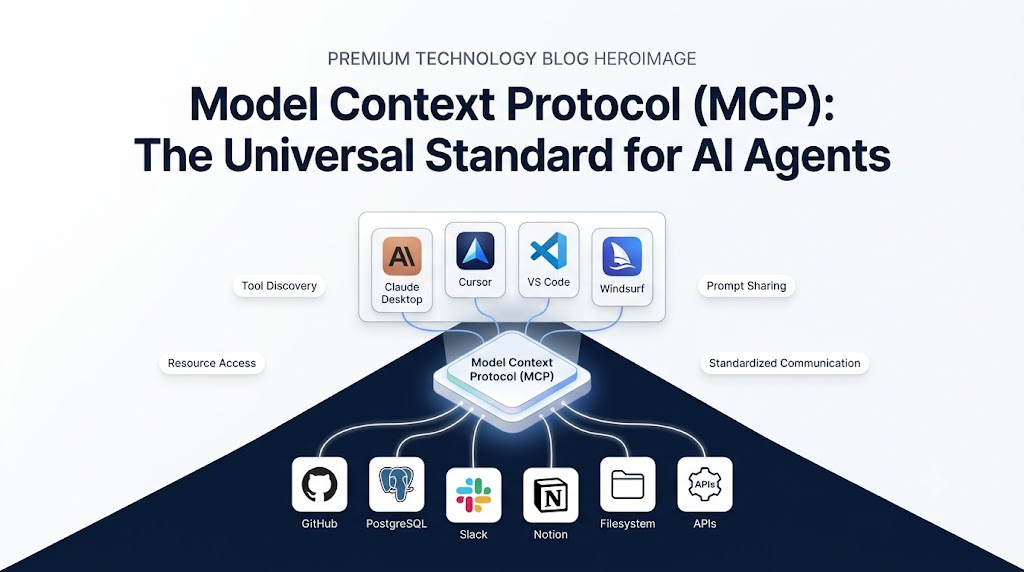
AI has progressed from chatbots to AI agents over the past year, moving beyond the limited scope of basic responses.In the last 12 months, AI has evolved from AI chatbots to AI agents, which is beyond simple responses and blank answers. Modern agents can search documents, ask a question of a database, communicate with an API, program code, and execute complex actions. As systems grow in capabilities, however, a new challenge arises: how to integrate AI applications with external tools and services on a scalable level.
In the modern world, each and every application of AI demands unique integrations. To access GitHub, you construct one integration if you want Claude to. Building another Cursor to use GitHub. Databases, Slack, Notion, internal company systems, and thousands of more tools are added to the mix and the same process is repeated.
This snap causes a considerable engineering burden. It takes more time for developers to create integrations than to create AI capabilities.
Anthropic’s solution to this problem involves the Model Context Protocol (MCP), an open standard that will enable AI systems to interact with tools, data sources, and services.
Many developers already refer to MCP as:
The new standard for AI agents: USB-C.
This article will cover the definition, significance, mechanics, and potential as a new key component of the future generation of agentic AI systems.
What Is Model Context Protocol (MCP)
Model Context Protocol (MCP) is an open interoperability standard designed to facilitate communication between AI systems and other tools, resources, and services.
In 2024, the protocol was introduced and opened sourced by Anthropic to solve one of the most critical issues of AI applications: complexity.
MCP offers a standard communication layer, instead of each AI application needing to create custom integrations for every tool. Developers can offer functionality in the MCP servers, and any MCP-compatible client can access that functionality.
It’s like a web browser and a website. This is because before the advent of universal HTTP, interoperability was hard. An important part of this was that HTTP gave a common language that allowed the browsers and servers to communicate in a consistent manner.
MCP’s mission is to achieve the same for AI systems.
Developers do not have to develop thousands of custom integrations and can build once and use it in many different AI applications.
Why MCP Matters for Agentic AI
Old fashioned chatbots mostly create text. Modern AI agents, however, are expected to take actions.
An agent for software engineering could:
- Search GitHub repositories
- Read documentation
- Create pull requests
Query databases
- A business assistant may:
- Access CRM systems
- Generate reports
- Query analytics platforms
- Send Slack messages
The usefulness of an AI agent relies increasingly on the way it can communicate with outside systems.
The integration becomes complex as the number of tools increases. A good agent has a great intellect, but if he or she doesn’t have the tools, he or she is limited.
To solve this issue, MCP develops a universal connectivity layer between AI systems and external services. This enables developers to concentrate on creating smart workflows, instead of managing hundreds of integrations.
The Problem MCP Solves: The M×N Integration Problem
To appreciate the motivation behind the creation of MCP, it is necessary to have a basic understanding of one of the greatest challenges in the modern world of AI systems: integration complexity.
AI agents rarely work alone these days. A coding assistant likely will need access to GitHub repositories, issue tracking, documentation systems, and databases. A business assistant could require access to CRM systems, analytics dashboards, internal knowledge bases, and communication tools. The more capable agents are, the more number of systems they need to interact with.
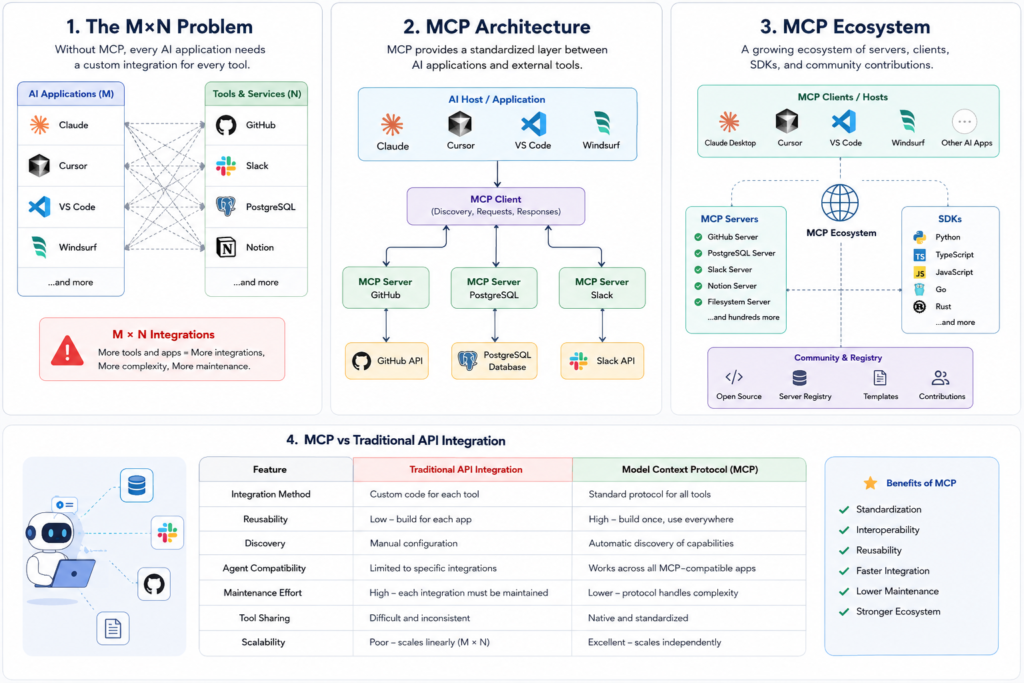
Each application developed with AI creates its own integration for each external service. This forms a problem that software architects call the M×N Integration Problem.
Suppose that there is an ecosystem that has:
- 100 AI applications
- 500 external tools
If there is not a common standard, each application will create and maintain its own connection to each tool.
The architecture resembles the following:
| Claude → GitHub Claude → PostgreSQL Claude → Slack Cursor → GitHub Cursor → PostgreSQL Cursor → Slack VS Code → GitHub VS Code → PostgreSQL VS Code → Slack |
In mathematics, this translates to:
100 Applications × 500 Tools = 50,000 Integrations
Each integration requires:
- Development effort
- Authentication logic
- Error handling
- Security reviews
- Documentation
- Ongoing maintenance
Worse, each platform has the same functionality, implemented multiple times. One builds a GitHub connector for Claude, Another builds a GitHub connector for Cursor, Another builds a GitHub connector for VS Code. It has approximately the same functions, but needs to be created several times.
This duplication hampers innovation and maintenance costs are high.
To overcome this, MCP has implemented a common protocol layer between applications and external services. Both parties use MCP, rather than integration with each application.
The architecture switches to:
| Application → Tool Application → Tool Application → Tool |
to:
| Application ↓ MCP ↓ Tool |
This significantly simplifies the integration process as the tools only have to provide an MCP interface and any application compatible with an MCP can readily leverage them.
In many respects, MCP is the answer to AI that USB was to hardware. A common standard offers the potential for interoperability across an entire ecosystem, rather than having to build a custom connector for each device.
How MCP Works
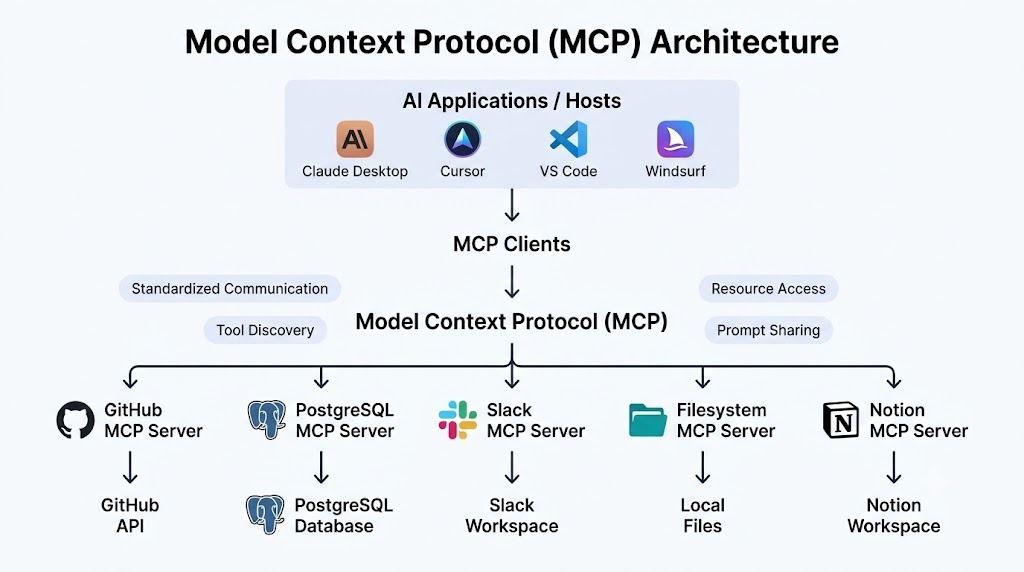
In simple terms, MCP is a client-server system developed specifically for AI systems.
It’s straightforward: AI applications should be able to find, access, and interact with external capabilities in a uniform way.
AI applications communicate with each other via MCP clients, rather than directly with databases, APIs or software services. Then these clients communicate with the MCP servers which provide functionality in a standardized fashion.
The simplified workflow is approximately:
| AI Agent │ ▼ MCP Client │ ▼ MCP Server │ ▼ External System |
Let’s take a look at what occurs when an AI agent requires information.
Suppose the user inquires:
List all open issues in our GitHub repository.
The AI model is not familiar with GitHub. Rather, it first looks at the capabilities offered by MCP.
The MCP client discovers that a GitHub MCP server exposes a tool called:
| get_open_issues() |
The model determines that this tool is appropriate, and asks for its execution.
The request is sent via the MCP client to the MCP server hosted on GitHub (for the user), and the MCP server will then communicate with the GitHub API. When the data is retrieved, it is returned via the MCP client and into the AI application’s context.
The procedure will be as follows:
| User Question │ ▼ AI Agent │ ▼ Tool Discovery │ ▼ GitHub MCP Server │ ▼ GitHub API │ ▼ Results Returned │ ▼ Final AI Response |
One of the critical points here is that the AI app doesn’t have to comprehend GitHub’s API directly. It requires only to be familiar with the MCP.
This separation has a number of benefits:
Standardization
All MCP servers offer capabilities via the same protocol. It could be GitHub, PostgreSQL, Slack, or even a customized enterprise app, but the interaction is the same.
Discoverability
Rather than integrating by hand, the AI application can dynamically find out what capabilities are available. This way, agents can utilize new tools without having to modify their code.
Reusability
Once a tool is made available via MCP it is accessible to all tools that are compatible with it. It no longer requires the developers to create the same integration multiple times again.
Security and Isolation
MCP establishes a managed interface between AI systems and external services. The authentication, authorization and access control system can be maintained on the server, not within the AI model.
The benefits of MCP are compelling, especially for enterprise settings where agents need to communicate with many systems, without compromising security or governance compliance.
MCP Architecture Diagram
Understanding MCP Hosts, Clients, and Servers
The best way to comprehend MCP is to envision it as a 3-layer architecture with Hosts, Clients and Servers.
There are specific functions of each component.
MCP Host
The Host program is the program that the user communicates with directly.
Examples include:
- Claude Desktop
- Cursor
- Windsurf
- VS Code AI Extensions
- Internal Enterprise AI Assistants
The host should be responsible for the user experience and managing the whole AI workflow.
The host checks the user’s request to decide which model to use, keeps the conversation state, presents the response, and manages interactions with the MCP clients.
Consider the host as the operating system of an AI experience.
Here, everything is combined.
For instance, if you request Claude Desktop to examine a GitHub repository, Claude Desktop becomes a host for the MCP. It handles your request, deals with the conversation and passes off requests to the MCP client layer for tool interactions.
MCP Client
The MCP Client is the communication link between the host and the available MCP servers.
It has the basic duties of:
- Discovering available servers
- Identifying available tools
- Accessing resources
- Executing tool calls
- Returning results
- Managing protocol communication
- It is like the client is a translator.
- The AI model communicates in terms of capabilities:
- Search documentation
- Read file
- Query database
- Create issue
The MCP client translates the requests into protocol compliant ones for MCP servers.
Capability discovery is one of the most crucial responsibilities of the client.
Once the new MCP server becomes available, the client can check to see what the server has to offer without having to write custom code.
This is one of the fundamental innovations that makes MCP scalable: It is a dynamic discovery mechanism.
MCP Server
The actual functionality is exposed into the MCP Server.
A server is an adaptor between MCP and external system.
Examples include:
- GitHub MCP Server
- PostgreSQL MCP Server
- Slack MCP Server
- Filesystem MCP Server
- Notion MCP Server
- AI apps can access certain capabilities of each server.
- A GitHub MCP server can give the following tools:
- Create Issue
- List Pull Requests
- Get Repository Information
- Search Code
- However, a PostgreSQL MCP Server can offer:
- Execute Query
- List Tables
- Get Schema
- Read Records
The versatility of MCP is that it allows the AI app to communicate with both the servers via the same protocol, despite the use of vastly different systems.
This abstraction layer significantly simplifies things.
AI applications need only to understand MCP, rather than hundreds of APIs.
The server now is responsible for converting the MCP request into whatever format is needed by the system underneath. The design also enables developers to expose any system as an MCP compatible capability to make the ecosystem highly extensible with tools and services for AI agents.
Core MCP Primitive: Tools
Tools are executable actions that AI agents can invoke.
Examples include:
- Creating GitHub issues
- Running SQL queries
- Sending Slack messages
- Searching internal documentation
A tool definition might look like:
{
"name": "search_docs",
"description": "Search company documentation"
}
Tools allow AI systems to perform actions rather than simply generate text.
Core MCP Primitive: Resources
Resources provide information that AI systems can access and consume.
Examples include:
- PDFs
- Documents
- Knowledge bases
- Configuration files
Unlike tools, resources are generally read-only and are primarily used to provide context.
Core MCP Primitive: Prompts
Prompts are reusable templates exposed through MCP.
Examples include:
Summarize this document for executives.
or
Generate release notes from these commits.
This allows organizations to standardize AI workflows across teams.
MCP vs Traditional API Integration
| Feature | Traditional APIs | MCP |
| Integration Method | Custom Development | Standardized Protocol |
| Discovery | Manual | Automatic |
| Reusability | Limited | High |
| Agent Compatibility | Low | Universal |
| Maintenance Cost | High | Lower |
| Tool Sharing | Difficult | Native |
| Multi-Agent Support | Limited | Strong |
Who Is Using MCP Today?
Claude Desktop
One of the first apps that supported MCP was Claude Desktop, where users can link Claude directly to filesystems, databases and external tools.
Cursor
Cursor has adopted MCP to enable coding agents to interact with development environments and repositories.
VS Code
Many AI-powered VS Code extensions are beginning to embrace MCP for standardized tool integration.
Windsurf
Windsurf has also incorporated MCP support, further expanding the protocol’s ecosystem.
The MCP Ecosystem Today
The MCP ecosystem has grown rapidly.
Today, it includes:
- Hundreds of community-built servers
- Open-source SDKs
- Registry systems
- Enterprise integrations
Supported languages include:
- Python
- TypeScript
- JavaScript
- Go
- Rust
This growth indicates strong momentum within the AI developer community.
How to Get Started with MCP
Option 1: Use Existing MCP Servers
The easiest way to start is by connecting existing MCP servers such as GitHub, PostgreSQL, Slack, or Filesystem servers.
Option 2: Build an MCP Server
A simple MCP server can be created using FastMCP.
Before looking at the code, it’s important to understand what we’re building. In this example, we create a lightweight MCP server that exposes a weather lookup tool. Any MCP-compatible client can discover and invoke this tool without requiring custom integration code.
from mcp.server.fastmcp import FastMCP

mcp = FastMCP("Weather Server")

@mcp.tool()
def get_weather(city: str):
  return f"Weather information for {city}"

mcp.run()
Option 3: Build an MCP Client
Advanced developers can build their own MCP clients by implementing:
- Tool discovery
- Resource access
- Prompt handling
- Server communication
This provides maximum flexibility for custom AI applications.
What’s Next for MCP?
MCP is a testament to a larger trend towards tool-assisted, connected AI systems.
These are likely to be future developments:
- Enterprise MCP marketplaces
- Multi-agent interoperability
- Richer authentication models
- Cross-platform compatibility
- Larger server ecosystems
The ability to interoperate will be vital as more AI agents become prevalent, and this will be facilitated by standards such as MCP.
Conclusion
Model context protocol (MCP) is one of the most crucial advancements in the budding world of agentic AI. MCP introduces a standardized approach to integrating AI systems with tools, resources, and services, tackling a critical challenge that has hindered the growth of agents.
Developers can create reusable capabilities that can be used with multiple AI platforms, instead of maintaining thousands of custom integrations. With the rise in adoption, MCP is becoming an essential building block for the next wave of AI applications.
FAQs
Q1. Does MCP apply just to Anthropic models?
No. MCP is open, meaning it can be used by any AI app that is compatible.
Q2. Is MCP going to replace APIs?
No. MCP is designed to operate on APIs and unifies the interaction between AI systems and APIs.
Q3. Is MCP open source?
Yes. Anthropic has made MCP an open protocol.
Q4. Is it possible to create my own MCP server?
Yes. MCP makes available SDKs and tooling to develop custom servers.
Q5. Can MCP be used outside of code applications?
Absolutely. MCP can be used to link AI systems with databases, CRMs, knowledge bases and many other enterprise systems.
Q6. Why is MCP important for Agentic AI?
Modern AI agents rely on external tools and services. MCP enables the same capabilities to be accessed in a common manner.
Also Read
MCP Primitives Explained: Tools, Resources, and Prompts With Real Examples
MCP Primitives Explained: Tools, Resources, and Prompts With Real Examples
Introduction To Model Context Protocol
Popular Posts
- Build and Evaluate a RAG Pipeline with RAGAS, LangChain, FAISS, and Groq (Step-by-Step Guide)
- Loop Engineering Explained: From Prompt Engineering to Self-Prompting AI Agents
- Build Your First MCP Server with FastMCP: A Complete Python Tutorial
- MCP vs Function Calling: Key Differences Explained (2026)
- What Is Model Context Protocol (MCP) – A Complete Guide for AI Developers